

Recently I had an interesting conversation with an IT techie who is just starting his journey with NSX, and I thought it will be nice to have the conversation in a form of a blog. Conversation may help people who are just starting with VMware NSX.
CuriousTechie: Hey! Recently our company adopted new IT strategies and it seems I have to work on a Product/Technology called NSX. Have you herd of NSX?
ITGuy: Oh yes! I have been working on NSX for few years. I may try to answer if you have any questions around it.
CuriousTechie: Great! Can you tell me what exactly is NSX?
ITGuy: On a very high level, NSX is VMware’s network-virtualization platform which allows to create virtual network services on top of existing physical networks and virtual server infrastructure. It uses Software Defined Networking to programmatically define networks on-demand for your virtual infrastructure without any changes on the physical network (OfCourse after the initial setup is done)
CuriousTechie: That seems very fascinating, but I lost you in some of the jargon’s here. What exactly is network virtualization and how is NSX doing that? How is it different from software defined networking?
ITGuy: Okay so as a networking person you do understand the layers of networking the “OSI model”. Using network virtualization, we can achieve all those networking layers in software. Traditionally if you want to do Switching then you needed hardware Switches, if you want to do Routing you needed hardware Routers and so on with LB and Firewalls. But with network virtualization you can do Layer 2 to Layer 7 within your ESXI host i.e., on a software kernel. Let’s do a white board to do a comparison between server virtualization and network virtualization.

CuriousTechie: But I do manage ESXi environments, and we do use distributed and standard switches on ESXi. Is that not network virtualization? How is NSX different?
ITGuy: Good observation and you are right.! But before we go further let me ask you few questions and that will help us set the context for network virtualization. Ok?
CuriousTechie: Sure!
ITGuy: You are managing the ESXi virtual environment, and you do connect your virtual machines to virtual networks or Portgroups right?
CuriousTechie: Yes, I do that very often.
ITGuy: Great! Let assume you need a new network subnet to connect your new virtual machines. Can you just create a Port Group with new VLAN/subnet and connect your machines?
CuriousTechie: Well, I can create a portgroup but connectivity can only be established once those VLANs are created with a SVI (Switch Virtual Interface) on the physical Switch and trunked on the server ports.
ITGuy: Perfect! That means the Layer 2 network service (VLAN) needs to be created on the physical network side and then you can use that virtual network for your virtual machine but you don’t have the capability to virtualize a Layer 2 network service on the ESXi.
CuriousTechie: Hmmm ok!
ITGuy: Have you ever created a router or a firewall or a load balancer in your ESXi host?
CuriousTechie: Nope!
ITGuy: Right! Because ESXi by default doesn’t have Network Virtualization capabilities. When you install NSX on an ESXi host then you can use L2 – L7 network services.
CuriousTechie: Okay I got the crux of it and would like to know more, but at this point one more question is bothering me. I understand what network virtualization is doing on a high level, but what is software defined networking?
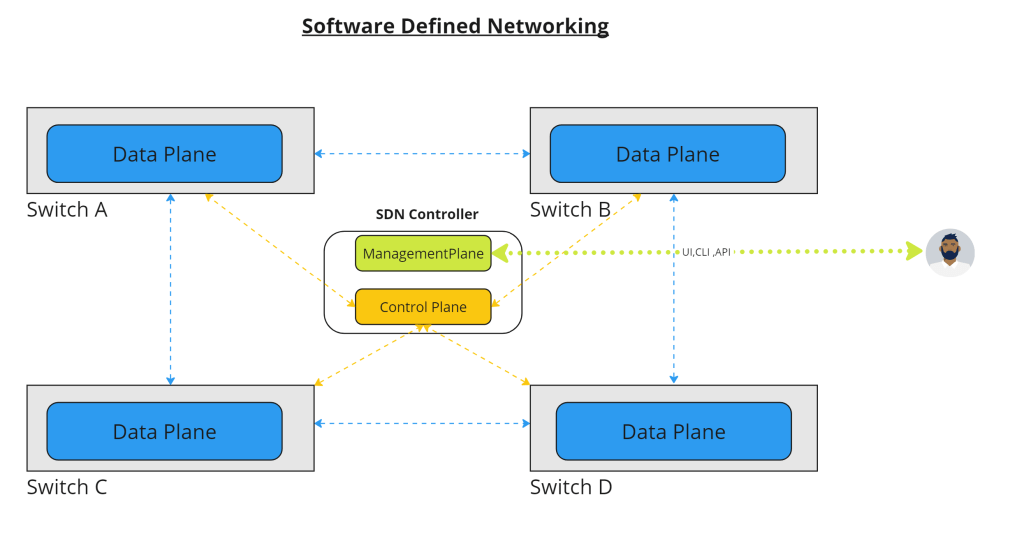
ITGuy: Well, definition wise SDN is “using a software to control your network and network devices” but let me explain in a plain terminology. SDN is the ability to separate the Management plane, Control plane and Data plane of your network infrastructure plus you can control all your networking needs programmatically (ex API).
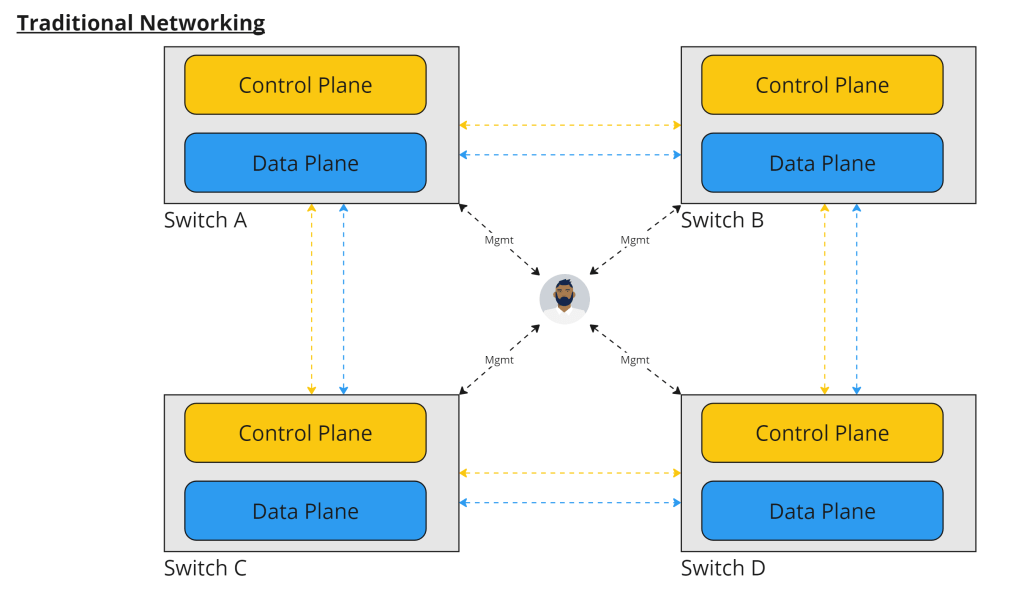
Let’s go back a step and think how we have been doing networking in a non SDN environment. If we have 4 Physical switches in the environment, then we will login to each switch using a terminal and put the configurations and then switches will maintain their own IP/MAC and other tables and can perform the network services.
In Software Defined Networking, there is a single component from where you have the ability to manage all your network devices as below.
CuriousTechie: How does NSX implement software defined networking?
ITGuy: NSX architecture is built on the principles of software defined networking. First component is NSX manager (management plane) which gives you the UI/API to login and manage your networks. NSX manager is a VM that runs on an ESXi host. NSX controller (control plane) maintains all the necessary information which is required to make a switching / routing, or any other networking decision example will the IP/MAC lookup. There are two types of control plane Central (CCP) and Local (LCP). NSX data plane actually comprise of ESXI hosts which actually forwards packets and also Edge VM which acts as an on-off ramp for a packet from virtual network space to physical network space. NSX data plane can comprise of many other components like Bare Metal servers and NSX public cloud gateways, containers etc.

CuriousTechie: You said NSX manager is a VM, but you didn’t say anything about Controller, is that a separate VM?
ITGuy: Good catch there, if we take a look back on the evolution of NSX. In NSX-V, which is an older version of NSX, there was a NSX manager VM and three NSX controller VM, even in earlier version of NSX-T there was one NSX manager VM and three NSX controller VM but now for all the versions after NSX-T 2.5 there have been a change in architecture. Now NSX manager functionality and NSX controller functionality have been merged into one VM i.e., for a decent production environment (highly available) you would have three VM’s serving the role of NSX manager as well as Controller. Three VM’s maintains a database and the database is always kept in sync so you may login to any one of the managers and do configuration and config is replicated to other members of the cluster.
CuriousTechie: This is interesting, and I have one last question for today. Are there any specific network hardware requirements to run NSX?
ITGuy: NSX is a 100% software solution, it leverages your existing network hardware (CISCO, Arista, Juniper etc.) it can be anything. To run NSX network services you just need physical IP connectivity between your hosts and NSX can build tunnels to run overlay networks on top of the physical IP connectivity.
CuriousTechie: What is an overlay and what is a tunnel? Okay I said previous question was my last question for today so lest’ park this question for our next meet?
ITGuy: Sure! See ya!
 Curious-Techies
2 Replies to “A Casual NSX Conversation”