
CuriousTechie: Hey, IT Guy! I am currently managing a NSX environment but there are plans to use NAPP, ATP and NTA in the environment. I am little confused about all these terminologies and what they do. I also heard that I must know Kubernetes/Containers to deploy NAPP. Can you help me connect the dots around these technologies?
ITGuy: Sure! Let’s tackle NAPP today!
NSX Application Platform (NAPP) is actually the infrastructure platform which allows you to run multiple Security services on it, aka ATP.
CuriousTechie: We are already using DFW for micro-segmentation in the environment, what other security services can we get if we deploy NAPP? What exactly is this product ATP?
ITGuy: ATP is not actually a product! It is a portfolio of different security services which enables you to have Advanced Threat Prevention capabilities in your SDDC environment. When you deploy NAPP, you can enable below services, which enables ATP capabilities.
- NSX Intelligence
- NSX Network Detection and Response – NDR
- NSX Malware Prevention
- Metrics
CuriousTechie: We already have NSX Intelligence running in the environment for traffic visualization and DFW rule recommendations which runs on single VM. Previously it was just one VM appliance, but this NAPP seems complex with K8s.
ITGuy: Remember back in the past, most of the environments were running only Bare Metal servers and now can you imagine a world without virtual machines?
CuriousTechie: Not really!
ITGuy: Exactly, the future is containers (K8s), and it makes sense to develop new features and offerings for any product on a containerized platform. VMware does understand this and has embarked on developing new features/products on containerized platforms. With one VM appliance you were able to use only Network Intelligence but when you deploy NAPP, you can potentially use all the ATP features on it.
CuriousTechie: What level of understanding of container and Kubernetes is required to deploy NAPP?
ITGuy: Kubernetes learning curve can be little steep for VMware admins and thus the NAPP automation appliance has been developed. This allows you to deploy NAPP without any need of K8s understanding.
CuriousTechie: Can you show me how to use this to deploy NAPP?
ITGuy: Sure! Let me show you some captures from the deployment I have done. You can follow this blog for the pre-requisite details but let me give you a high-level overview.
- Deploy Automation appliance.
- Provide details about the vCenter objects, networks, IP etc. “Critical“
- Automation Appliance will deploy a HA proxy VM.
- Automation Appliance will create content library to fetch all the required files to create the NAPP cluster.
- Automation Appliance will activate TKGs on the vSphere cluster.
- Automation Appliance will create a name space and Guest cluster.
- Automation Appliance will deploy NAPP in the namespace.
CuriousTechie: These steps look easy enough, but can we go into a bit of details for the understanding.
ITGuy: Sure!
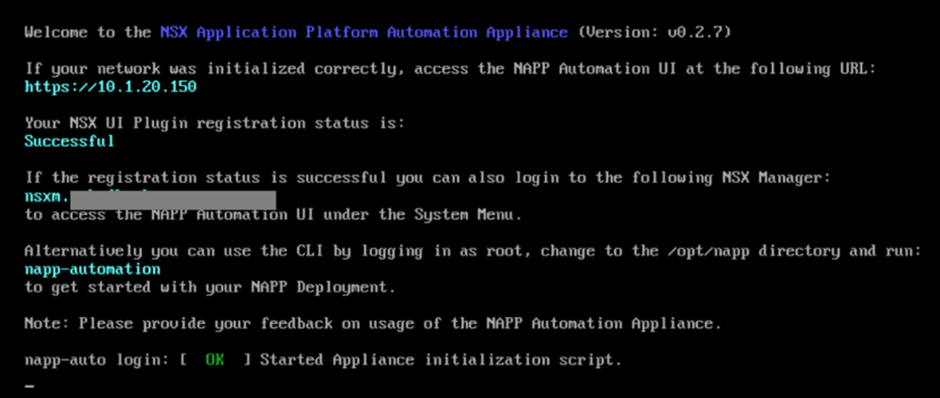
- You need to deploy the Automation Appliance, which is a standard OVA deployment. During the deployment you get the option to register the automation as a plugin to NSX. I would recommend using the plugin and also be watchful of the passwords that you are going to use for registering with NSX, I have seen issues with some special characters in the password like “&”. Something to keep in mind if you see issues in registration.
Once the appliance is up you can see the registration status in the console and then you can use the given IP to access it or use the NSX plugin to access it (recommended).
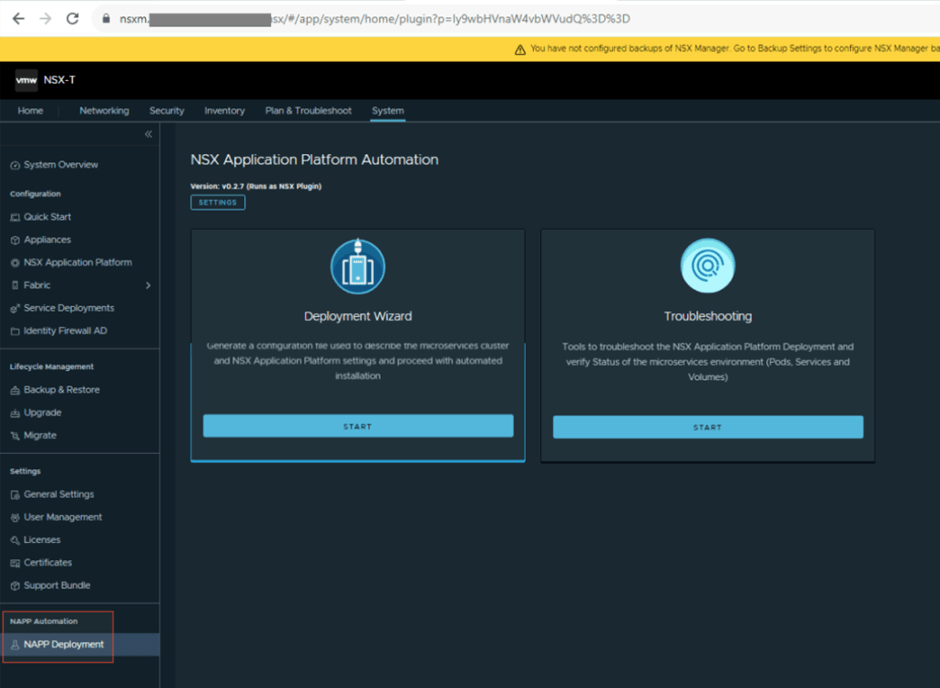
You will see the Automation Appliance plugin under system in NSX UI
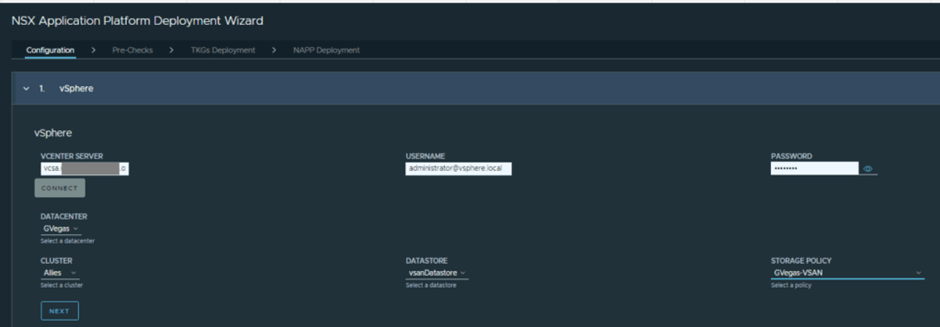
2. This is the most critical step and if all goes well then, the only step that you need to take for a successful NAPP deployment using automation.
- Validate the interoperability between components
- Use an account which has appropriate admin level privileges on vcenter which will be used to configure content library, TKGs components etc.
- A valid storage policy which will be used for the storage class
- vSphere Cluster which will be configured for TKGs
- Network requirements are straightforward, you need three networks.
- -> Management: mgmt nic for HA proxy VM, mgmt nic for TKGs supervisor VM’s. Usually the management network for NSX, vCenter etc. is used for this one as NSX must also have internet connectivity or should at least be allowed to some public endpoints for IDPS signature set etc. NOTE: you will need consecutive available IPs in this network for supervisor VM’s and I will recommend having room for 6 IPs.
- -> Frontend: This will be the frontend VIP network of your HA proxy and will be the entry point to your NAPP cluster services.
- -> Workload: This will be the network where your NAPP cluster Control and Worker nodes will connect
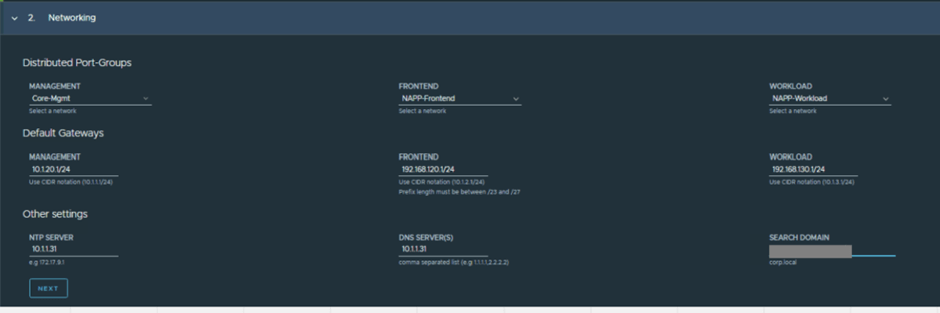
CuriousTechie: Are these NSX segments or Port Groups?
ITGuy: These can be DV Port Groups, usually NAPP is deployed in the management cluster which is often not prepared for NSX thus there is no need of NSX segments here. Please note, all of the above networks reach out to various different endpoints in internet and if there is no direct internet on these networks then you must whitelist certain URLs on your Firewall/Proxy etc. Here is a short list but please make sure to read the current documentation for exact requirements.
wp-content.vmware.com
projects.registry.vmware.com
api.nsx-sec-prod.com & *.amazonaws.com
nsx.lastline.com
nsx.west.us.lastline.com nsx.nl.emea.lastline.com
projects.registry.vmware.com
api.nsx-sec-prod.com & *.amazonaws.com
- Details about the HA proxy VM like hostname, user/password and respective IP for management, frontend and backend(workload). A /28 network range within the frontend network which will be used for VIPs

- Few IP details about the TKGs Supervisor VMs which shall connect to Management and workload network. NOTE: There are in-built checks in the automation appliance and it will not allow to proceed if there are any IP overlaps etc.
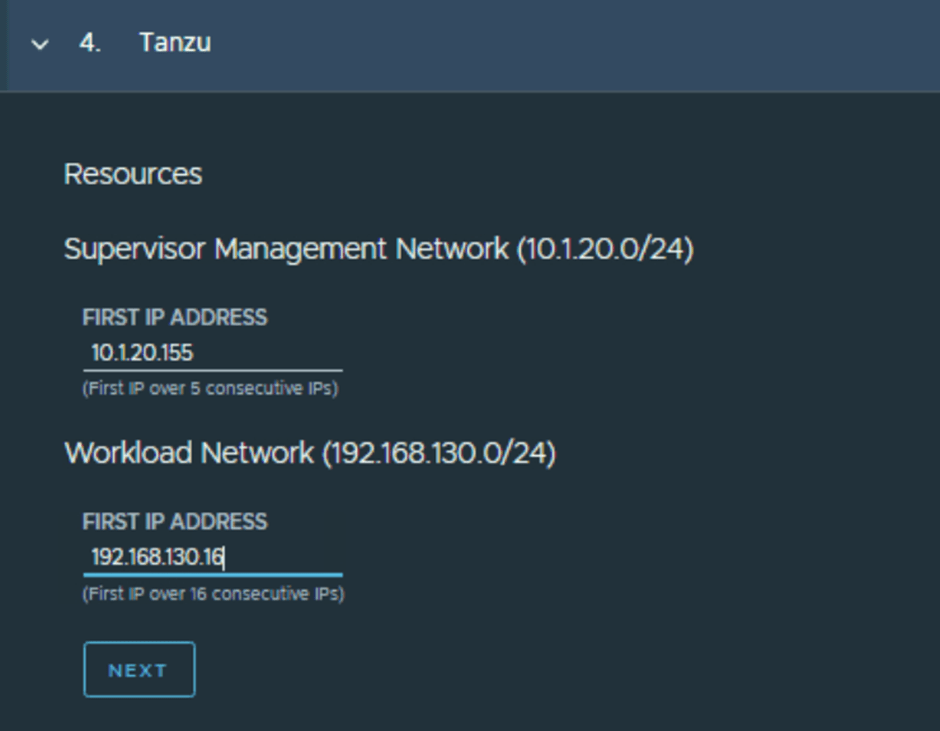
- Details about the NAPP
- -> Version: Select the version of NAPP, make sure to double-check compatibility with NSX version
- -> Form Factor: Will depend on the services you would like to run and will result in a different number of Control and Worker VM’s
- – >Service and Messaging: NSX will connect to these NAPP services using FQDNs so make sure to get the DNS name resolution in place beforehand. Wizard will show the exact IP for each service, and you can enter FQDN accordingly.
- -> Docker Registry and Helm Repo: These details will be auto populated and there is no need to change these under normal deployment.

At this point manual steps (Step 1 & step 2) are all done, and automation appliance will start its job (Step 3 to Step 7) starting with a pre-check then TKGS deployment and finally NAPP deployment.

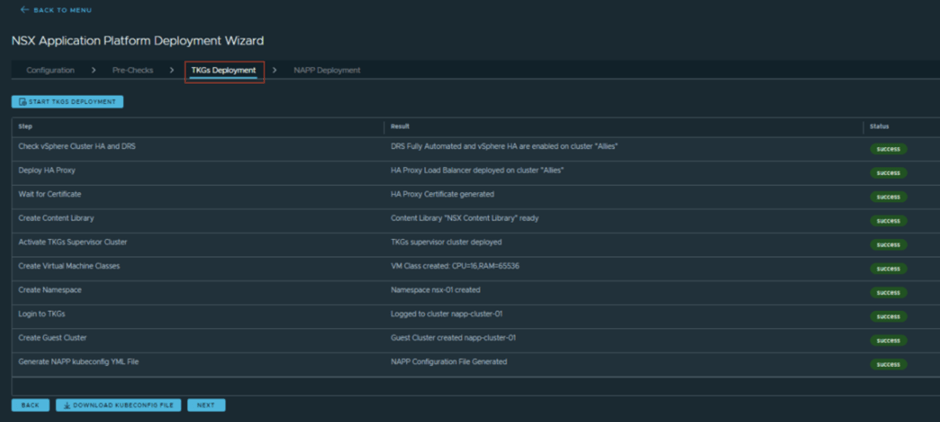
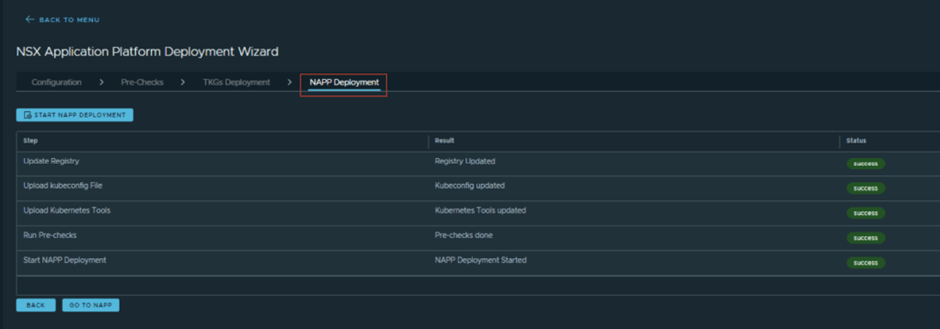
CuriousTechie: This looks cool, and I didn’t see any step which needed Kubernetes knowledge. Pretty cool!
ITGuy: Yes, like I said! Automation appliance has been developed for the ease of NAPP installation. You can also use the automation appliance for checking logs and for some kind of troubleshooting (that may need some K8s knowledge 😉 )

CuriousTechie: Good to know about this, I can see “kubetcl” and “kubectl-vsphere” here i.e. I will be able to connect to the NAPP cluster API from this automation appliance for any kind of troubleshooting.
ITGuy: Absolutely! And you can use any other Linux or Windows machine also for troubleshooting if required. Below you see I am using my windows Jumpbox to validate the services running on the NAPP.

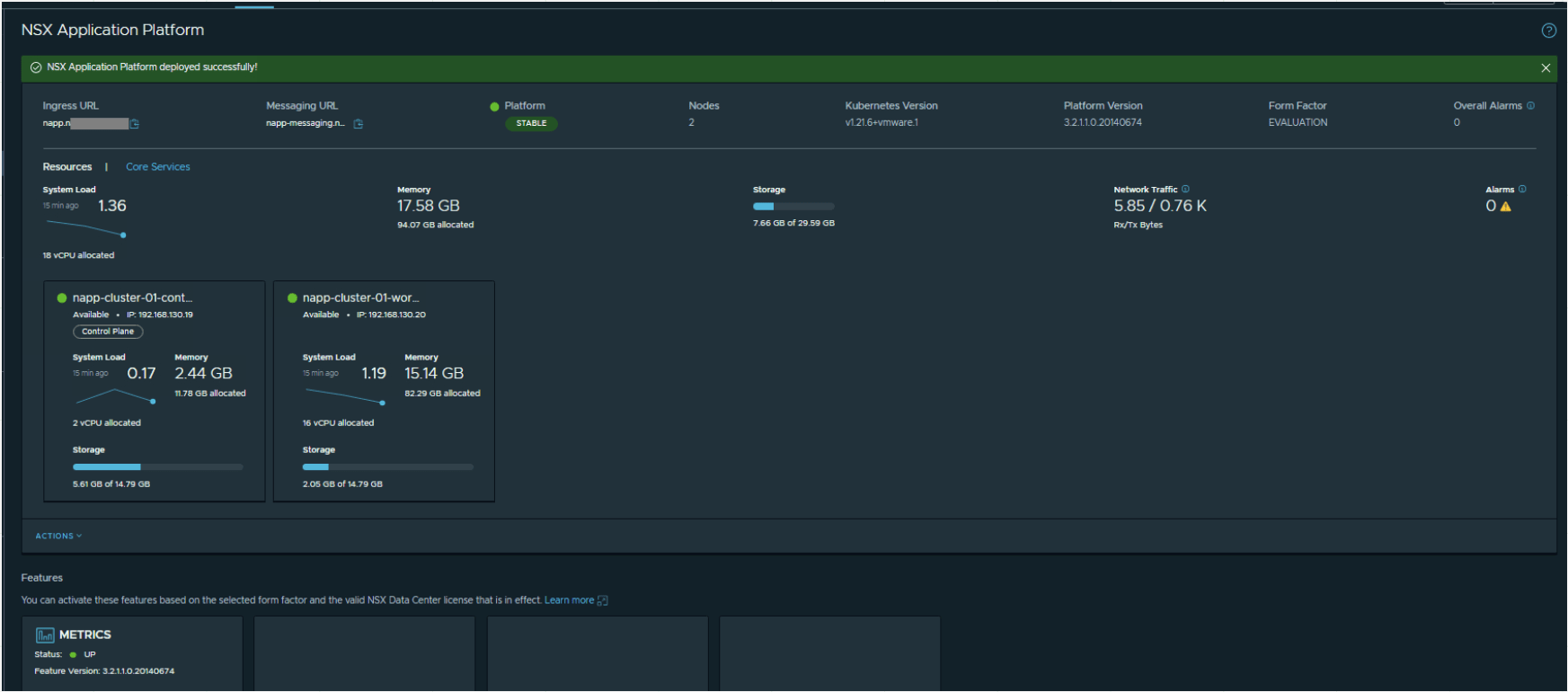
And finally, you have a successful NAPP deployment!

CuriousTechie: Wow! Very cool! Maybe we can talk about the ATP features on the next meet?
ITGuy: Sure! See you later!
 Curious-Techies
One Reply to “”