

A short conversation on how to check and troubleshoot network connectivity from AVI Service Engines.
CuriousTechie: Hello IT Guy, I am new to AVI and sometimes I get stuck in troubleshooting connectivity issues on service engines. Is there a way to check connectivity of the data nics from the service engines?
ITGuy: Sure there is a simple way! You may login to the network namespace of the data nic inside the service engine and check the connectivity.
CuriousTechie: Can you please show me how to do that? Here is my scenario!
I have NSX-T cloud with service engines running, I have created a virtual service but the Virtual Service is DOWN and the Pool is DOWN as well. Also I am not able to reach the SE data nics.



ITGuy: To troubleshoot any kind of connectivity issues we must have a clear picture about the source and destination under consideration. Firstly, let us check the connectivity from SE data nic to Pool members.

CuriousTechie: Okay sure, where should I start?
ITGuy: Let’s login to the Avi controller and connect to the service Engine from where you want to check the connectivity. Use the below command to attach to the SE
“attach service engine ‘SE name'”
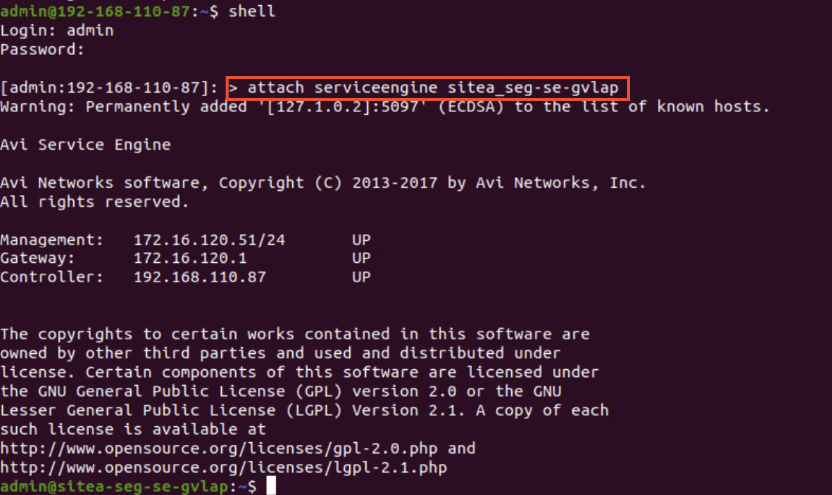
From here you can switch to the IP Network Namespace for the NIC you want to check the connectivity.
“ip netns” -> Will show all the namespaces(vrf) on this service engine and you can select the namespace from where you are expecting connectivity.
“sudo ip netns exec ‘NS name’ bash” -> you can take a bash shell to the name space and then run normal commands like ‘ping’ and ‘route‘ for the network troubleshooting.

Above output gives a strong idea that the SE data interface does not have any route to the backend pool member. Next ideal step will be to check the route configuration in your vrf.
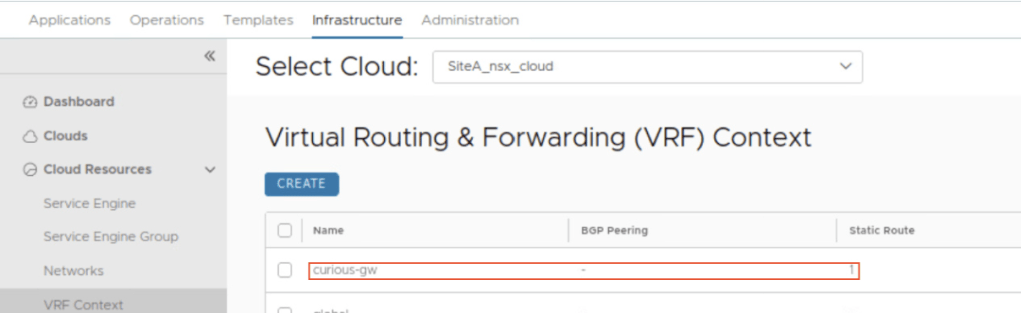
CuriousTechie: Okay cool! I was not aware of this technique. I found a typo on my route configuration of the vrf and have corrected it.
ITGuy: Let’s check the route and connectivity again.

Now you have a default route and thus you have proper connectivity to you backend pool member, lets also verify the same in UI.

CuriousTechie: Thank you so much for sharing this troubleshooting methodology.
 Curious-Techies