

A short conversation on how to check the applied Distributed Firewall Rules on a vnic!!
CuriousTechie: Hello IT Guy, I am working on a project to implement DFW rules in an environment and often need to check exactly what firewall rules are applied on a vnic, is there a way to do that?
ITGuy: Sure ! We can talk about three different ways to do that and we can talk about pro’s and con’s of each.
CuriousTechie: Okay cool!
ITGuy:
- From NSX UI
- From ESXi Host shell
- From ARIA Operations for Networks aka vRNI
From NSX Manager UI
Follow the below steps to check the DFW rules applied on a vnic from NSX UI
- Switch to Manager UI from Policy UI(Default)
- Go to Logical Switches( In Manager view, Segments are called Logical Switches)
- Go to Ports and find the VM’s vnic for which you want to check the firewall rules
- Go to Related->Firewall Rules
- Validate the DFW rules applied on that particular vnic


CuriousTechie: That’s interesting and looks very convenient!
ITGuy: Yes, pro of the method is its very convenient to check but the NSX Manager view may not be available in many cases like VMC or AVS environments.
From ESXi Host Shell
Follow the below steps to check the DFW rules applied on a vnic from ESXi Host Shell
- Find out the ESXi host where the VM is running
- Login to shell using SSH
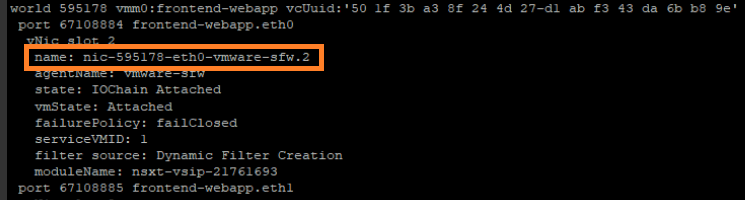
- Run the command “summarize-dvfilter” to list all the dvfilters running on the host
- Find the Name of the vnic filter that you want to check the applied rules Ex. “name: nic-595178-eth0-vmware-sfw.2“
- Run the command “vsipioctl getrules -f nic-595178-eth0-vmware-sfw.2“
- Validate all the rules applied on the vnic

This method gives a very detailed information about the DFW rules applied on a vnic and also gives the details about the IDPS rules applied on a vnic (if any). The challenge for this method is to get the shell access to the host which is often restricted for administrative/security reasons and also in cloud environments like VMConAWS etc ESXi host shell is not available for customers.
From ARIA Operations for Networks aka vRNI
ITGuy: This is probably the easiest of all the methods
- Find the VM in vRNI
- Check the configured Firewall rules


CuriousTechie: Wow! That is really simple and helpful!
ITGuy: Yes! vRNI makes it pretty easy and probably the only option which can be used in environments like VMC etc. and about the cons of this method, firstly you must have vRNI available and secondly it doesn’t show Layer 2 rules applied on the vnic.
There are also other ways to check these rules but let’s park it for another session.
CuriousTechie: Okay cool! Will try few of these techniques during my project implementation.
 Curious-Techies
One Reply to “”