

A short conversation on how to run API calls on Browser to check the time of DFW rule creation or modification time!
CuriousTechie: Hello IT Guy, I need to check the time of creation and modification of a Distributed Firewall rule. Is there a quick way to check these details in the browser itself.
ITGuy: Yes it is doable but depends on the browser, what browser do you use?
CuriousTechie: Currently I am using Mozilla Firefox for this environment, will it be possible to get this data out of the box without any extension or plugins?
ITGuy: Yes sure, let’s login to your NSX manager UI and will show you how to get this information.
CuriousTechie: Here is my NSX manager Policy UI and I need to find the time of creation/modification details of rule number 2024.

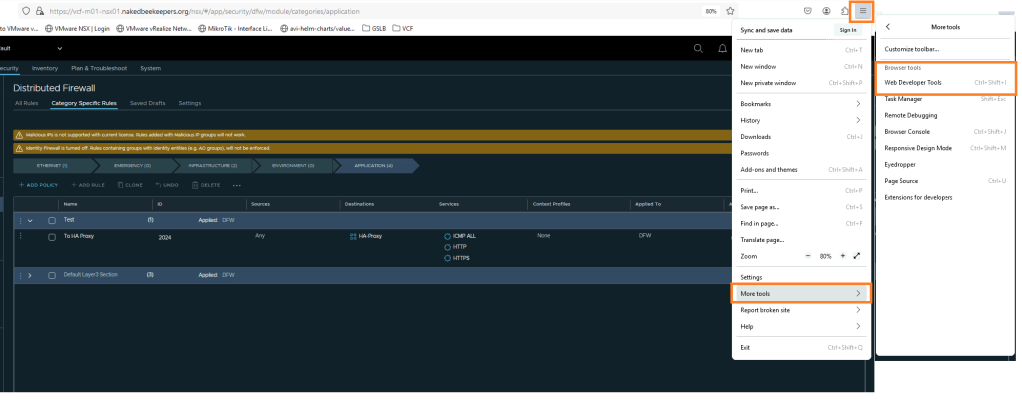
ITGuy: Okay! Open the Web Developer Tool of the browser from top right menu or you can use the short cut key combination Ctrl+Shift+I
Follow the below steps
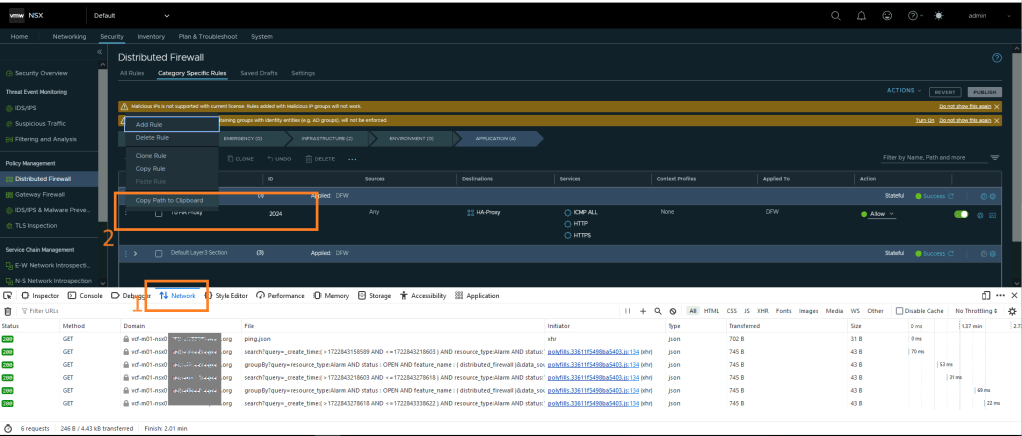
- Go to the Network Tab of Web Developer Tool
- On the NSX UI screen, click on the three dots of the Firewall rule and Copy Path to Clipboard
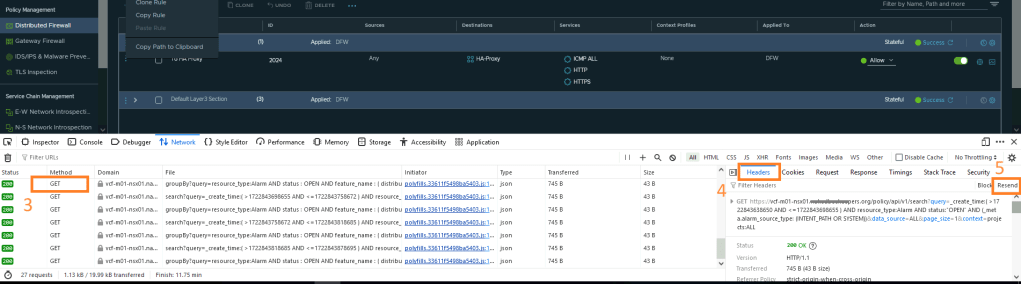
- Click on any one of the GET requests from the list.
- Go to Headers tab
- Click on Resend button
- Paste the previously copied path on the GET request tab after https://nsx-url/policy/api/v1/{copied path}
- Click on Send button
- Check on the Headers tab and confirm you have received a Status 200 OK
- Go to the Response tab and you will be able to get all the details about this rule


ITGuy: Here you can get all the details of the rule with creation/modification time with the user details too. The timestamps are in the format of Unix Timestamp and if you are not familiar with Unix Timestamp then you may read about it here and can also convert the time to human readable format.

CuriousTechie: Thank you so much, this will be a great time saver to run API calls where we don’t have access to tools like Postman or CURL.
ITGuy: Absolutely! Please be cautious while using this method to run API calls. Personally I limit my use of this method only to run GET methods to get something quickly and defer to other tools like Postman/CURL for other scripting use cases.
CuriousTechie: Got it!
 Curious-Techies