
A candid conversation about security terminologies in the buzz of current security industry.
CuriousTechie: Hello IT Guy, I am just starting my journey in the IT security industry. I am confused about a few terminologies like Zero Trust, Micro Segmentation, vDefend, DFW, etc. Can you please help me to wrap my head around these to build a better understanding?
ITGuy: Sure, I can help you with that. Let’s follow a Top to Down approach to build the understanding.
CuriousTechie: Okay, what is actually the top layer of this security product?
ITGuy: All of these terms are NOT part of a single security product!!
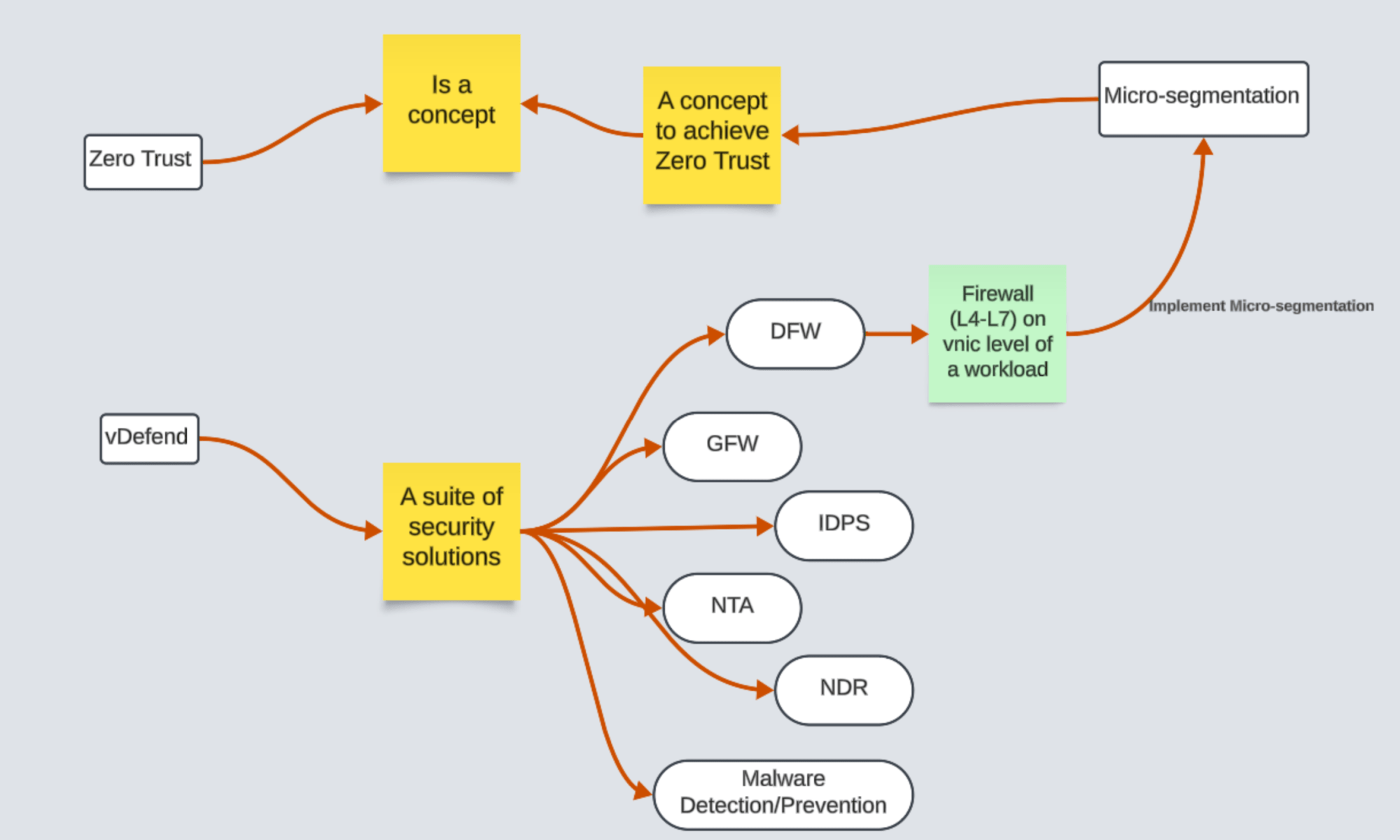
Let’s start from Zero Trust, Zero Trust is NOT a security product! It is a Concept with various definitions and it is subject to interpretations. Let’s talk about the below definition!
“Zero Trust is a security model that ensures data and resources are inaccessible by default. Users can only access them on a limited basis under the right circumstances, known as least-privilege access.”
CuriousTechie: Can you help me understand this with a simple example?
ITGuy: Let’s consider you are an employee of a company and you have the company laptop. You have initially configured the laptop to connect to the company WIFI. It also accesses internal websites once you are inside the premises. But everyday when you reach office you need to put in your credentials to access to internal resources(may be MFA). Although your laptop is registered, UUID, MAC details are whitelisted. Still, you cannot access internal resources without authentication. This means resources are inaccessible by default and access is granted on a limited basis. For example, 24 hours and is based on the privilege or permissions your account have.
CuriousTechie: Understood! How can we use this in a datacenter and what is Micro segmentation?
ITGuy: Let’s talk about segmentation! In IT networking terms, segmentation means dividing the network into different zones. A zone is considered a network boundary within which there is no inspection of traffic. All entities within a zone are free to talk with each other. Across the zones, you can pass the traffic via Firewall to inspect and allow only required traffic.
CuriousTechie: Which point in a network we can place firewall to create zones?
ITGuy: Traditionally, you would divide zones as per your organization’s need and have dedicated subnets/vlans for each zone. Firewalls would be placed at the Layer2 boundary in-line with Layer3 router. In the below diagram, you can place Host 1 &2 and VM’s in different zones . You can place VM 1 &2 in one zone and VM 3 &4 in other zone because you are passing the traffic via Router and can potentially inspect the traffic via Firewall(Black & Brown) in the below figure.
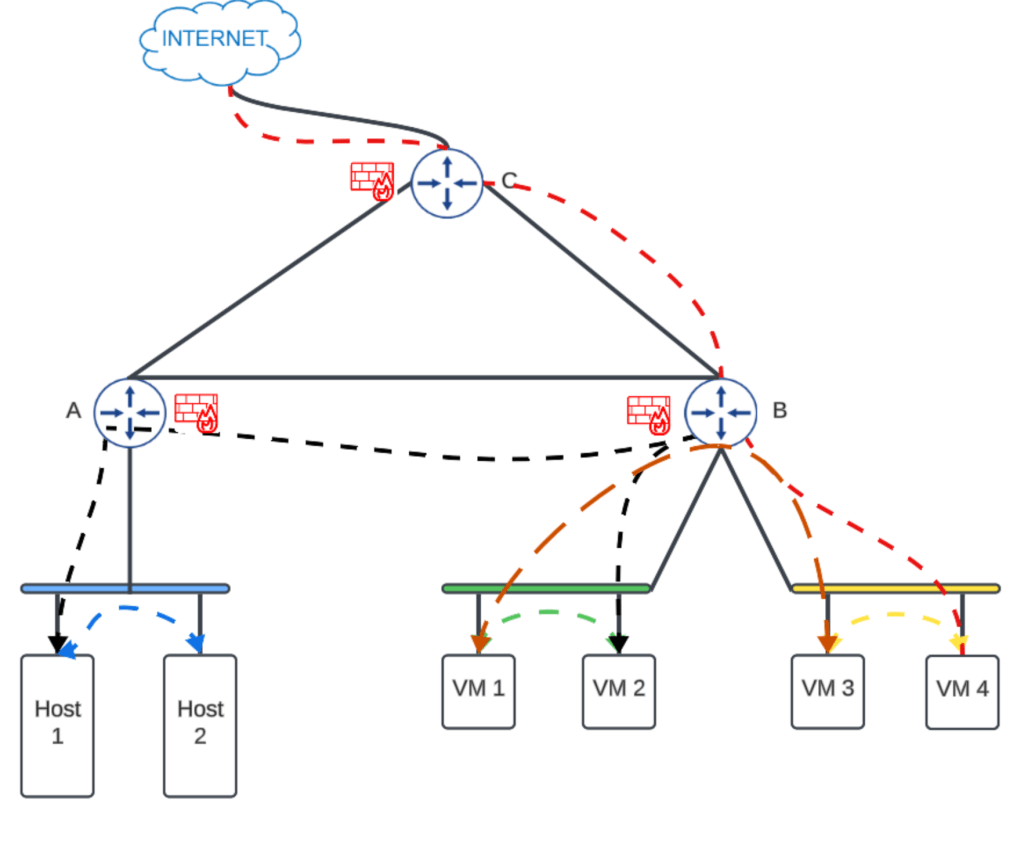
As you see, with this traditional segmentation methodology you cannot inspect the traffic within your Layer2 boundary (Blue, Green & Yellow)
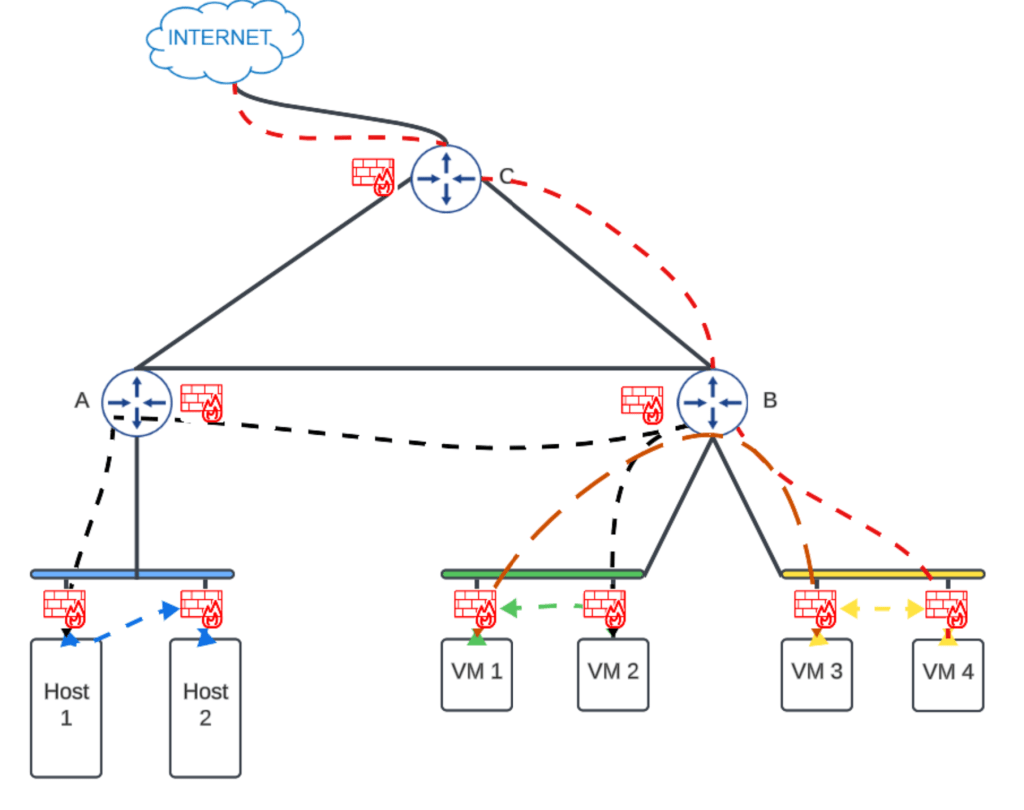
Micro-segmentation is the ability to construct network security zone boundaries per machine in order to segregate and secure workloads independently. That means you will have the capability to inspect and control the traffic between the virtual machines within the Layer 2 boundary of the network.(Blue, Green & Yellow)
CuriousTechie: Got it! But we can achieve this using OS firewalls right?
ITGuy: Yes you may do this using OS firewalls like IP tables and Windows Firewall. However, there are two main challenges with that approach.
- OS firewall runs inside the Operating System. If an attacker is able to compromise the Operating System, then the attacker can easily render the firewall useless.
- Operational overhead – If your environments have 10000 VM’s, then imagine the effort it will take. You will need to implement the firewalls on each of them. This task requires substantial effort and not a feasible approach to adopt.
CuriousTechie: Can vDefend or DFW help to achieve micro-segmentation and avoid the above challenges?
ITGuy: Yes! Absolutely! vDefend (previously NSX) is the brand name which have multiple NSX security solutions under its umbrellas like
- DFW – Distributed Firewall
- GFW – Gateway Firewall
- IDPS – Intrusion Detection & Prevention System (both on Gateway and Distributed)
- NTA – Network Traffic Analysis
- NDR – Network Detection and Response
- Malware Detection & Prevention
Let’s talk about how Distributed Firewall avoid the above challenges with OS firewall and helps to achieve micro-segmentation.
- DFW (Distributed Firewall) runs on the ESXi kernel. It inspects and controls any traffic ingress or egress to or from a virtual machine running on the ESXi host. The Operating System running on the VM (Windows/Linux etc.) has no control over DFW. Even if the OS gets compromised by an attacker, it is next to impossible to disable this firewall.
- vDefend-DFW architecture is based on the principles of Software Defined Networking which separates the Management Plane and Data Plane. Irrespective of the number of workloads in the environment, the management of the Distributed Firewall rules will be centralized. It will be done from a single pane of glass. You can read a little about about SDN in here
CuriousTechie: If we implement DFW in the environment does it mean we achieve Zero-Trust?
ITGuy: Like I said before, Zero-Trust as a concept and it is subject to interpretation.
For example, you have implemented DFW rules to only allow Layer 4 TCP port 443 from VM1 to VM2. However, an attacker can potentially send non-HTTPS traffic over this port. To improve the security, create a DFW rule to allow Layer 4 TCP 443. Add Layer 7 HTTPS with TLS 1.2 to restrict the traffic in a granular level. This methodology is often referred to as Defense in Depth. vDefend offers multiple security solutions to achieve Defense in Depth and we can talk about it in the next session.
CuriousTechie: Thank you! Now I have clarity of thoughts around all these terminologies vDefend/DFW: Zero Trust/Micro Segmentation.
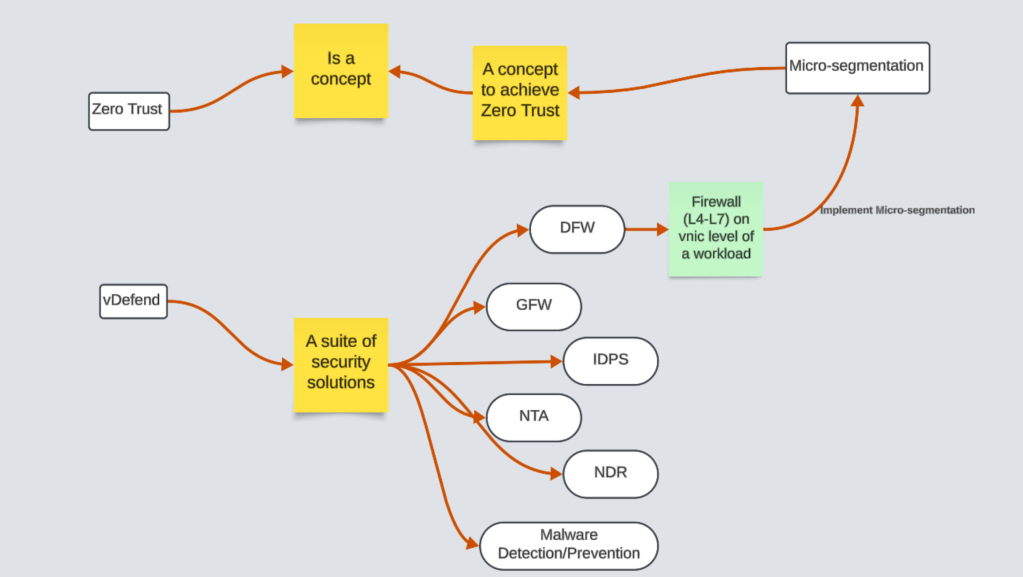
ITGuy: Here is the whiteboard drawing for your reference!
 Curious-Techies
3 Replies to “Demystifying Security Terminologies: Zero Trust, Micro Segmentation, and vDefend”