

A discussion on vDefend Security Intelligence, also known as NSX Intelligence, for enhanced visibility within the Software-Defined Datacenter.
CuriousTechie: Hello IT Guy. In our last conversation here, we discussed micro-segmentation. Now, I have a solid understanding of how vDefend DFW can support it. However, I’m managing an existing brownfield environment with hundreds of applications and thousands of virtual machines. What’s the best approach to implement micro-segmentation in such a complex setup?
ITGuy: This is a very common scenario faced by every enterprise when they embark on their journey towards micro-segmentation. To sail through this journey you need two major things to consider as mentioned below.
- A methodology
- Tools
CuriousTechie: Okay, what methodology should I follow to get started with micro-segmentation?
ITGuy: You must understand, achieving micro-segmentation for any large scale environment is a journey and cannot be done in a day. You can adopt a three step approach to get started!
First step, implement rules to macro segment your environment into zones like Prod, Test. This will immensely help to reduce the blast radius or attack surface within your Software Defined Datacenter. “An easy win”!!!
Second step, figure out all the shared infrastructure components in the environment like Active Directory, DNS etc. Implement rules to allow communication to/from these to the workloads or zones whatever makes the most sense for your environment. This is doable because infrastructure services mostly work on known standard protocols like DNS port 53 etc.
Third step, figure out the list of most critical applications (Crown Jewels) in your environment. Start working towards securing them in small batches with defined priority.
CuriousTechie: I can implement First and Second step but have a major challenge with the Third step. Most of my Crown Jewels are legacy applications. I do not have any documentations to tell me which ports are required for the application to work.
ITGuy: That’s where tools come into play to help you progress. One such tool is Security Intelligence, also known as NSX Intelligence. It provides visibility into the exact traffic moving within your environment. You can focus on your crown jewel applications and analyze their specific traffic patterns.
CuriousTechie: Will it just show me the traffic patterns? Can it also give the rules required to segment an application?
ITGuy: You can run rule recommendations focused on your crown jewel application, which will analyze observed traffic flows to suggest Distributed Firewall (DFW) rules and appropriate security groups. This information can be reviewed with your application team to validate functionality. Once validated, you can seamlessly create security groups and deploy the recommended rules directly to NSX through NSX Intelligence.
NOTE: Seeing a flow doesn’t necessarily mean it’s essential for the application to function; it could be malicious. Therefore, it’s crucial to validate the traffic before implementing any rules.
CuriousTechie: Interesting! How can I enable this tool? Does it use any agents on VM to collect these flow details? Where does it process all these data?
ITGuy: Wow! Lot of questions!
You can enable NSX intelligence if you have NAPP(NSX Application Platform) running.
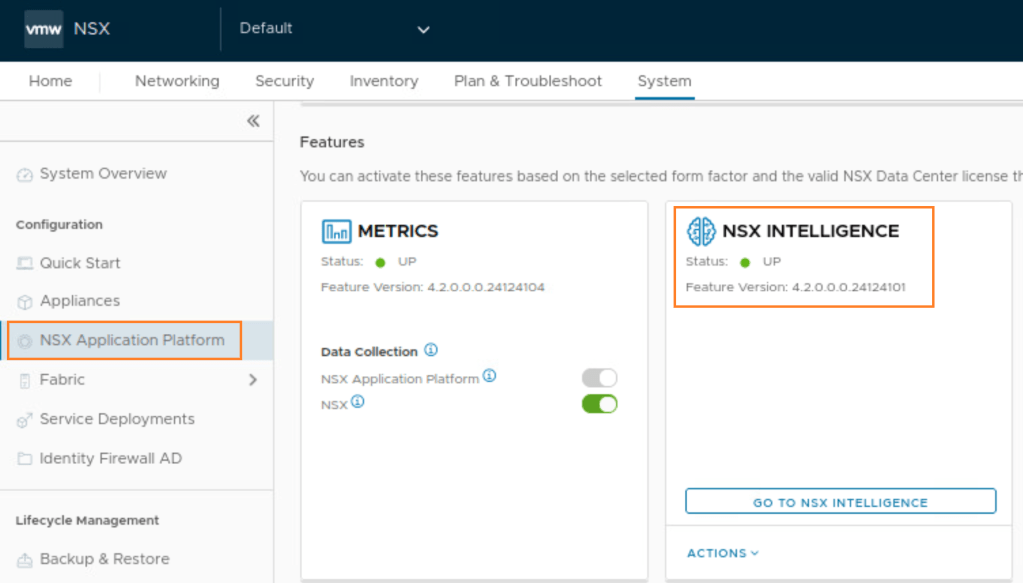
It doesn’t use any agent on the Operating System of a VM. It collects these details from the vnic level of the VM. This collection of flow details can be enabled per vSphere cluster basis.

All flow details are sent to NAPP, a Kubernetes-based application that powers vDefend features like Intelligence, NTA, Malware Prevention, and NDR. The data received from workloads is processed and analyzed using advanced machine learning capabilities. NAPP offers both traffic visibility through visual representation and provides Distributed Firewall (DFW) rule recommendations for selected entities.
CuriousTechie: Understood, can you please help to update the details about this in whiteboard that we used last time?
ITGuy: Absolutely!!

CuriousTechie: Hey!!! What are these “Detectors” mentioned in the whiteboard?
ITGuy: Good observation!! Detectors actually feeds data to NTA for traffic analysis. We can discuss about NTA and Detectors on the next meet.
CuriousTechie: Sure!
ITGuy: If you are looking for more in-depth information on how to use Security Intelligence, there are many great blogs. You can start from my personal favorite blog here and have fun.
CuriousTechie: Thank you!
 Curious-Techies
One Reply to “”