
A discussion on vDefend NTA( Network Traffic Analysis) and how it can improve the SDDC security posture.
CuriousTechie: In our last conversation here, we briefly touched upon NTA (Network Traffic Analysis). I am trying to explore more about it. However, I do not see the term NTA anywhere in NSX or NAPP UI. Can you help me understand, how can I get started with NTA?
ITGuy: I absolutely understand your confusion here. NTA is not a feature that you can enable directly on the NAPP UI. NTA actually piggy backs on top of NSX Intelligence and you can enable NTA detectors once you enable Intelligence.
Network Traffic Analysis (NTA) helps you(security admin) to detect anomalous activity and malicious behavior in the environment. NTA examines network traffic and traffic flow records by using machine learning (ML) algorithms and advanced statistical techniques. NTA identifies abnormal activity, whether it be by hosts, in protocols, or inside the network traffic itself.
CuriousTechie: Where can I find it in NSX UI?
ITGuy: In NSX UI, you will find these NTA detectors under Security-> Suspicious Traffic -> Detector Definitions. As of today there are 14 detectors which you can enable.

CuriousTechie: Are there any pre-requisites to enable and use these detectors?
ITGuy: Pre-requisites are pretty straight forward for NTA.
- Need a valid vDefend ATP(Advanced Threat Prevention) license
- Enable Intelligence(collect flows) on NAPP(run ML for analysis)
NTA detectors are broadly classified into two types.
- Detectors which needs a learning period to establish a baseline of the network traffic pattern. Any deviation from this baseline get categorized as an event after the learning period. Learning period can be between 6 to 14 days depending on the detector.
- Detectors which do NOT need a learning period and can generate events based on if/else condition of network traffic pattern.
CuriousTechie: Can you please help me with an example of both the types of detectors?
ITGuy: Sure!
- Destination IP Profiler: Detects the attempt made by internal devices to perform unusual connections toward other internal hosts. It needs a learning period of 10 days. This time establishes a baseline of what is a normal traffic pattern between two internal endpoints. As there can be various traffic patterns between two endpoints thus a learning period is required.
- Domain Generation Algorithm: This detector identifies anomalies in the DNS lookups made by an internal host. These anomalies may be caused by DGA (Domain Generation Algorithm) malware. For example, unresolved DNS records (NXDOMAIN)which can be one the indicators for DGA. This detector looks for a very specific network pattern. Therefore, it does NOT need a learning period to establish a baseline.
NOTE: Domain Generation Algorithm is a program that generates large numbers of domain names that are used to launch malware attacks, host malicious content, or redirect users to malicious websites. Cybercriminals use DGAs to make it difficult for security professionals to predict and block these domains because they constantly change.
CuriousTechie: Do I need to implement DFW micro-segmentation before I can implement/enable NTA?
ITGuy: Absolutely Not! Network Traffic Analysis is a Detective security tool in the environment and Firewalls are Preventive/Corrective security tools. They will compliment each other for a comprehensive security posture but have no dependency on each other.
NOTE: There are two NTA detectors DGA & DNS Tunneling, which actually needs a Firewall rule with L7 DNS context profile. This is required to extract the DNS information for the detection. This can be an open rule allowing DNS traffic with a L7 context profile. Alternatively, it can be scoped to your environment’s DNS server as the destination, depending on the environment.

CuriousTechie: Is there any dependency between IDPS(Intrusion Detection and Prevention System) and NTA?
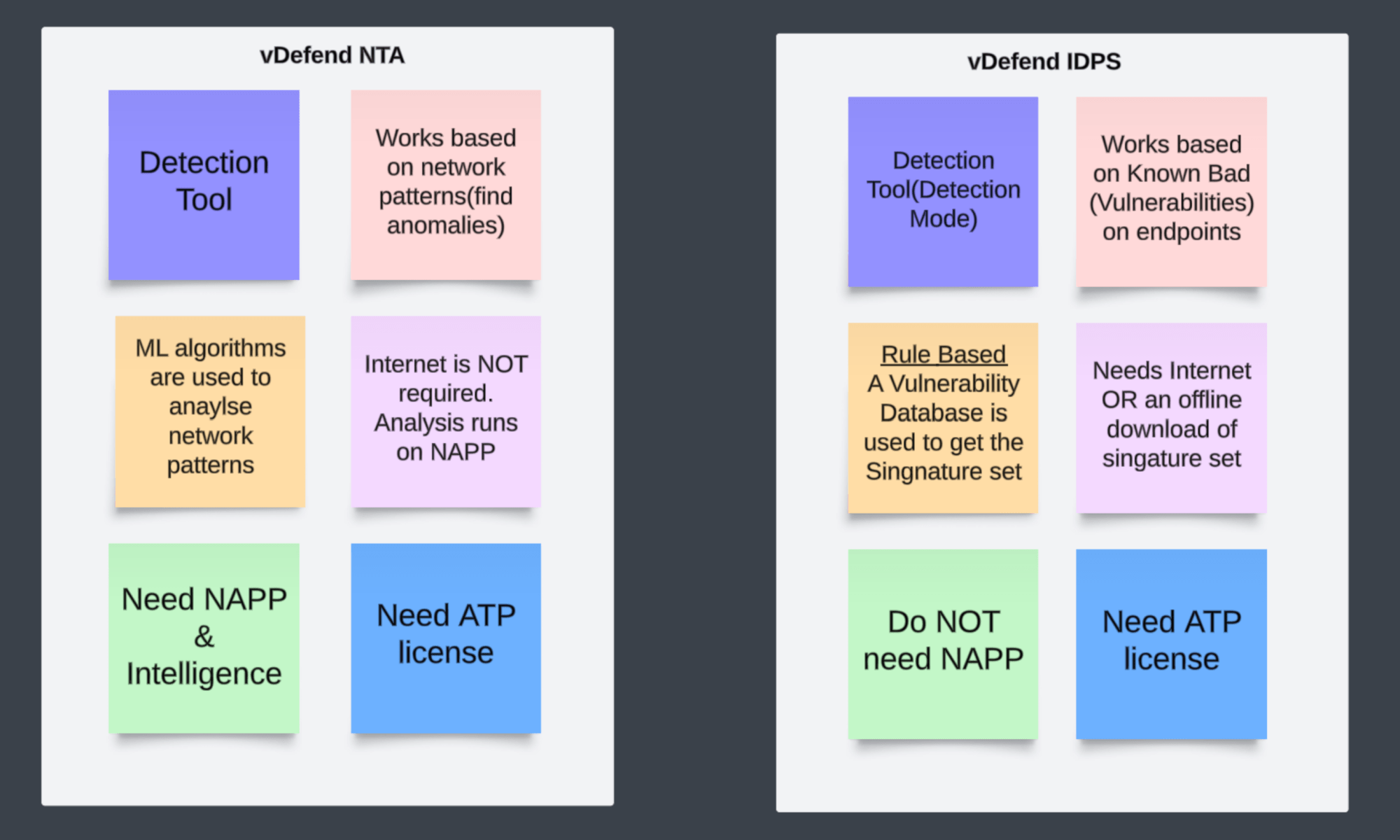
ITGuy: NO! Both NTA and IDS (Intrusion Detection System) are detection tools. But they work differently, and there is no dependency between vDefend NTA and IDS. Let me help you with some point about each of them.

CuriousTechie: This is very helpful! Can you point to me to some more resources for further reading and understanding of vDefend NTA.
ITGuy: Sure! You can check out the Official white papers here. If you are interested in learning with a Hands On approach then you can try this hands on lab “VMware vDefend Firewall with Advanced Threat Prevention HOL-2570-02-ANS-L” here
CuriousTechie: Thank you!
 Curious-Techies
One Reply to “”