

A brief discussion about Application Level Gateways and their use with vDefend Distributed Firewall
CuriousTechie: Hello IT Guy! I am implementing Distributed Firewall in my SDDC environment. I have created a DFW rule to allow FTP access on TCP port 21, users are able to login to FTP server but not able to move files around. Can you help me to troubleshoot this issue?
ITGuy: Sure! Can you show me the DFW rule you have created for the FTP access?
CuriousTechie: Here is the rule
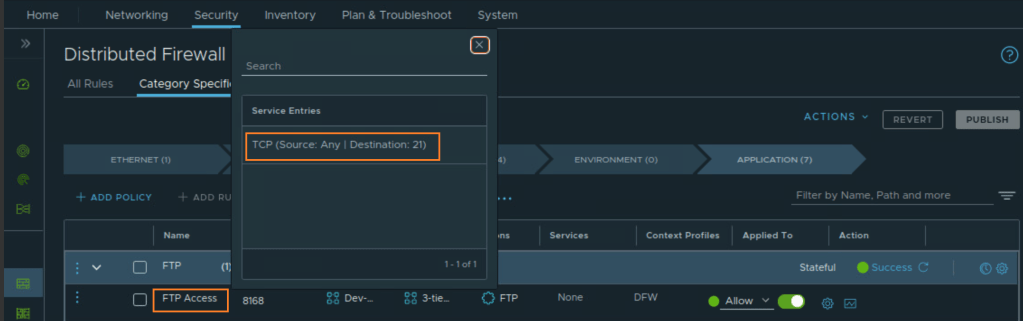
ITGuy: The problem is evident! You are using a normal TCP port instead of an ALG.
CuriousTechie: What is an ALG?
ITGuy: An Application Level Gateway (ALG), also known as an Application Layer Gateway, is a security component that augments the functionality of firewalls. It operates at the application layer (Layer 7) of the OSI model, which means it is capable of understanding and processing application-specific traffic.
CuriousTechie: Can you help me to understand this concept with a practical example?
ITGuy: First, let’s change the rule to use FTP ALG instead of a normal TCP port. We should validate the FTP connection, we will do this while we capture the traffic. We can take a look at the packet capture for your FTP traffic to understand this in a practical manner.
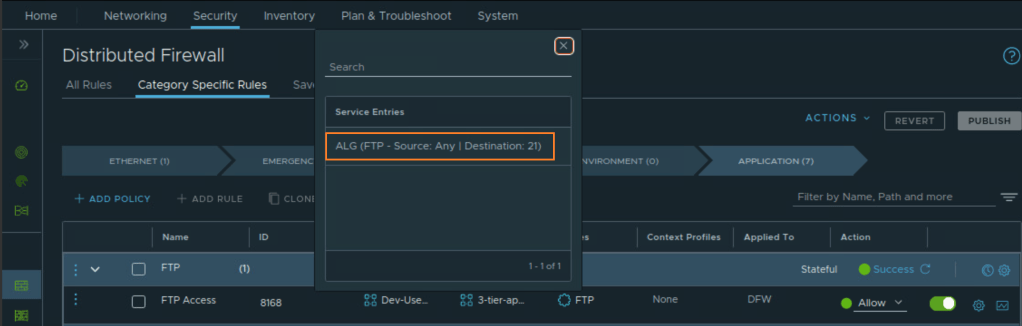
CuriousTechie: I am able to use the FTP server without any issues after changing the port to FTP ALG.
ITGuy: Awesome! Let’s take a look at the packet capture for the this FTP communication.
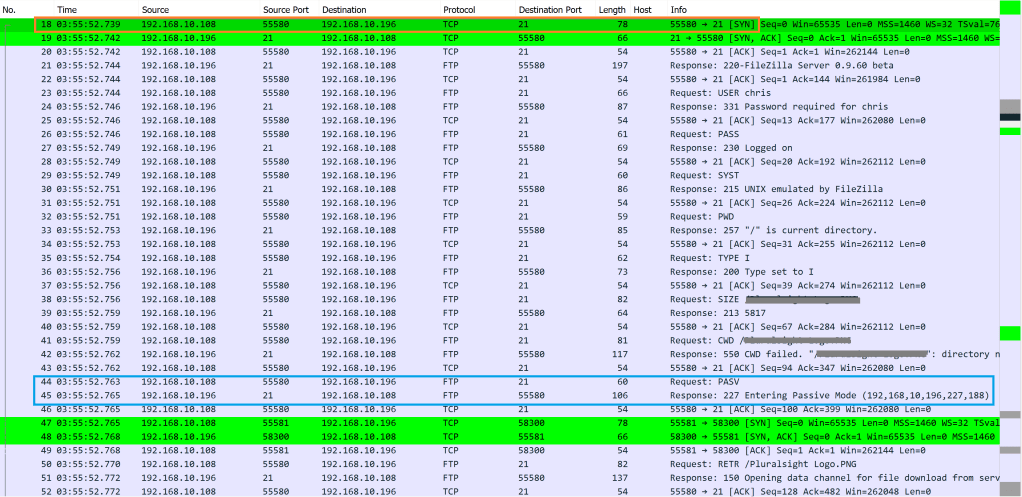
FTP communication started at packet number 18, you can see the Source 192.168.10.108 and Destination FTP server 192.168.10.196 with Port 21. The user gets authenticated. Then, look at packet number 44 & 45. A request for PASV is sent to the FTP server and FTP server responds stating “Entering Passive Mode”. Lets take a look inside packet number 45.
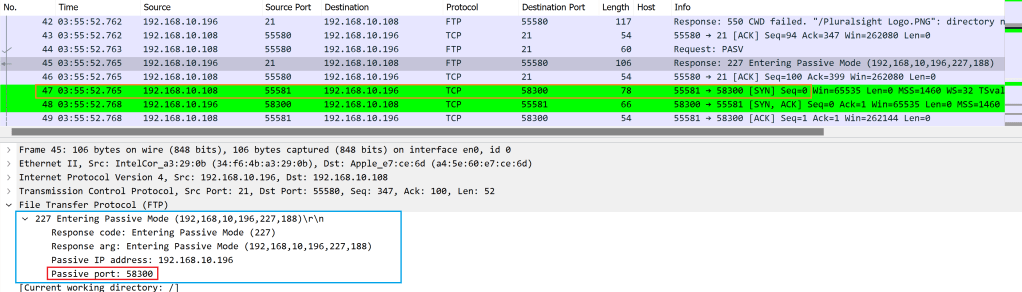
FTP server sent back a Passive Port: 58300. The client will use this port to connect to the FTP server for further data communication. Packet number 47 shows a new TCP connection from Source 192.168.10.108 and Destination FTP server 192.168.10.196 with Port 58300.
An ALG used in a stateful DFW rule has the application awareness. It dynamically opens port TCP 58300 to allow the FTP data transfer. This doesn’t occur when you use a normal TCP port 21. Therefore, the FTP data transfer was initially failing when normal TCP port 21 was used.
CuriousTechie: Understood! What are the different types of ALG supported in NSX?
ITGuy: Check the exact list of ALG’s supported for a particular version of NSX in official documentation. Here is the doc link for NSX version 4.2 and below is the list of supported ALGs
FTP, TFTP, MS_RPC_TCP, MS_RPC_UDP, ORACLE_TNS, SUN_RPC_TCP and SUN_RPC_UDP –> Supported on DFW
FTP and TFTP –> Supported on Gateway Firewall
CuriousTechie: Thank you for the explanation!
 Curious-Techies