
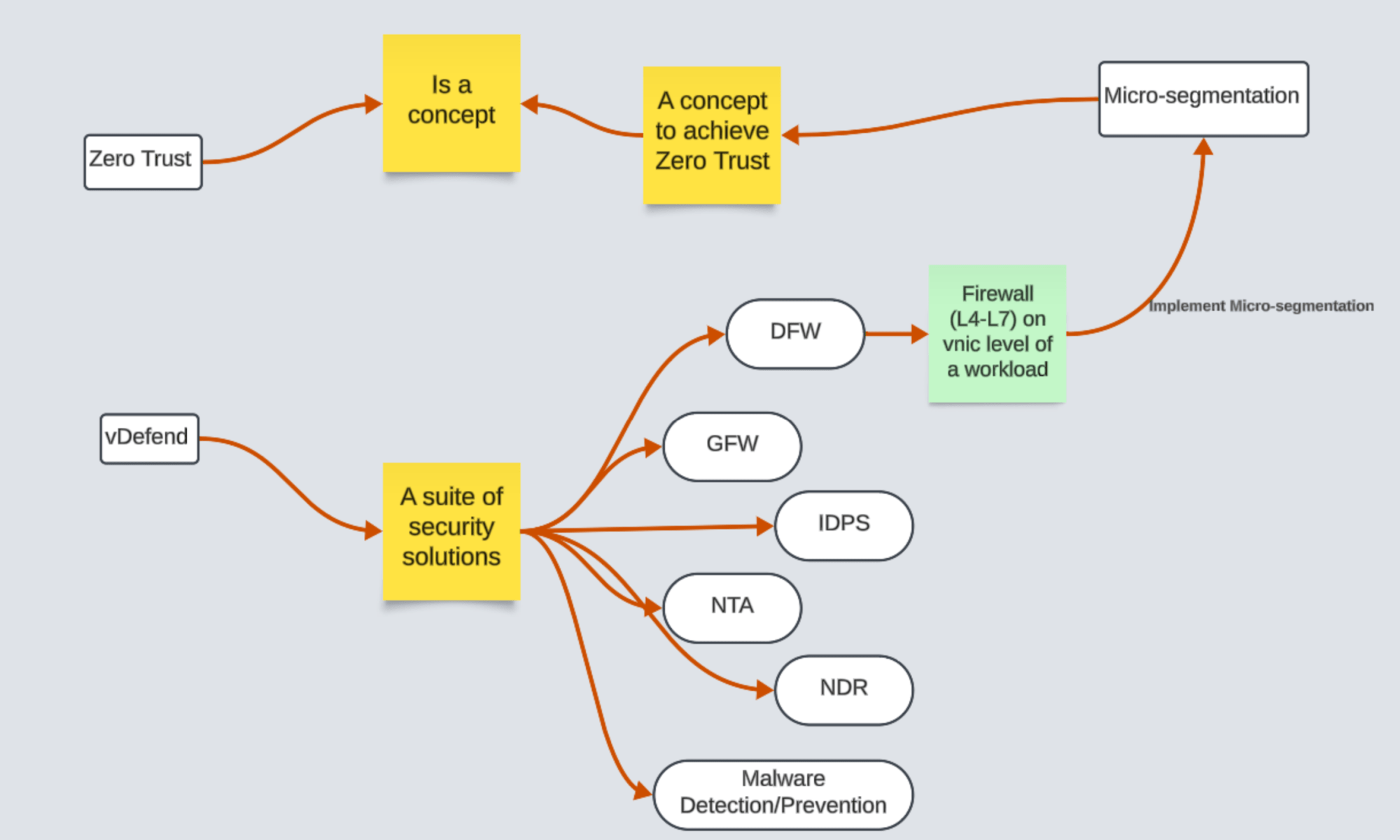
A candid conversation about security terminologies in the buzz of current security industry.
CuriousTechie: Hello IT Guy, I am just starting my journey in the IT security industry. I am confused about a few terminologies like Zero Trust, Micro Segmentation, vDefend, DFW, etc. Can you please help me to wrap my head around these to build a better understanding?
ITGuy: Sure, I can help you with that. Let’s follow a Top to Down approach to build the understanding.
CuriousTechie: Okay, what is actually the top layer of this security product?
ITGuy: All of these terms are NOT part of a single security product!!
Let’s start from Zero Trust, Zero Trust is NOT a security product! It is a Concept with various definitions and it is subject to interpretations. Let’s talk about the below definition!
“Zero Trust is a security model that ensures data and resources are inaccessible by default. Users can only access them on a limited basis under the right circumstances, known as least-privilege access.”
Continue reading “Demystifying Security Terminologies: Zero Trust, Micro Segmentation, and vDefend”







 Curious-Techies