Unlocking Micro-Segmentation Potential with vDefend Security Intelligence

A discussion on vDefend Security Intelligence, also known as NSX Intelligence, for enhanced visibility within the Software-Defined Datacenter.

CuriousTechie: Hello IT Guy. In our last conversation here, we discussed micro-segmentation. Now, I have a solid understanding of how vDefend DFW can support it. However, I’m managing an existing brownfield environment with hundreds of applications and thousands of virtual machines. What’s the best approach to implement micro-segmentation in such a complex setup?

ITGuy: This is a very common scenario faced by every enterprise when they embark on their journey towards micro-segmentation. To sail through this journey you need two major things to consider as mentioned below.

  • A methodology
  • Tools
Continue reading “Unlocking Micro-Segmentation Potential with vDefend Security Intelligence”

NSX Intelligence: Checking Applied Rules on a VM

A short conversation on how to check the applied Distributed Firewall Rules on a VM by using NSX Intelligence!!

CuriousTechie: Hello IT Guy, during our last conversation here we discussed about three ways to check applied DFW rules but you did mention there is another way to check the rules, can we talk about that?

ITGuy: Sure ! You can leverage Security Intelligence aka NSX intelligence to validate the rules applied on a VM.

CuriousTechie: I have been using Security Intelligence to get flow information and recommendations but never seen how to check applied rules using it, can you show me?

ITGuy: Sure !

  1. Go to Plan & Troubleshoot
  2. Go to Discover & Take Action
  3. On the Top bar Select Computer -> Search and select the VM that you want to check the applied rules.
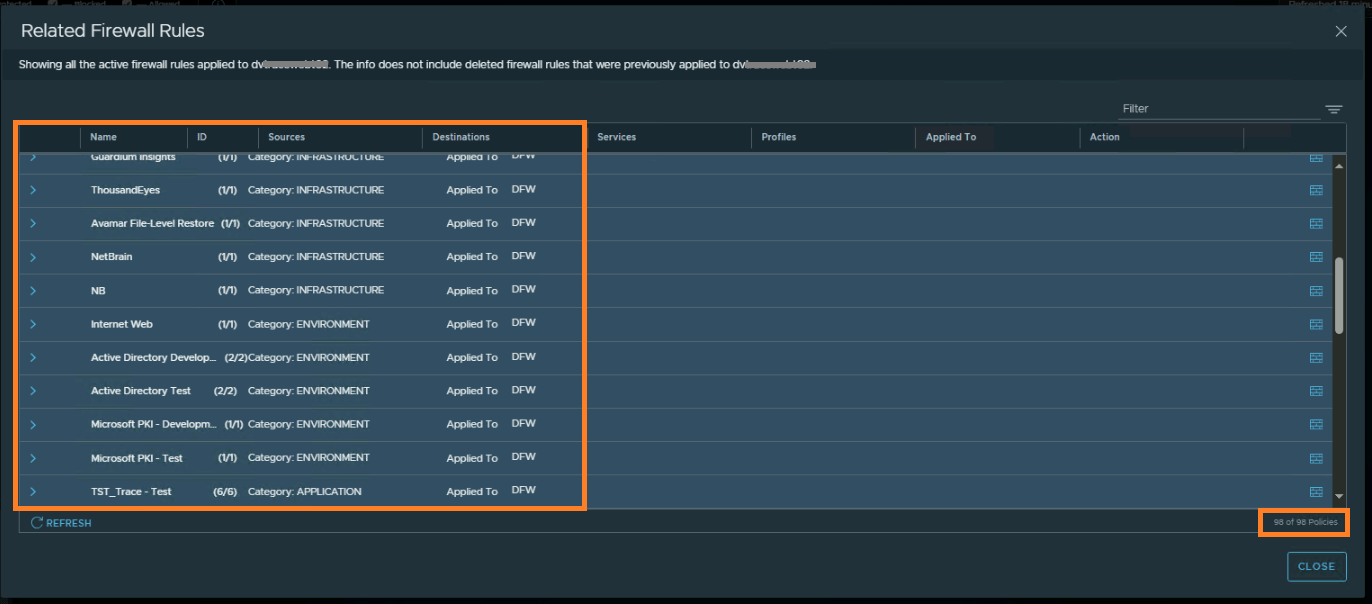
  4. Right click the VM -> Go to Related Firewall Rules
  5. You will see all the rules applied on that particular VM
Continue reading “NSX Intelligence: Checking Applied Rules on a VM”