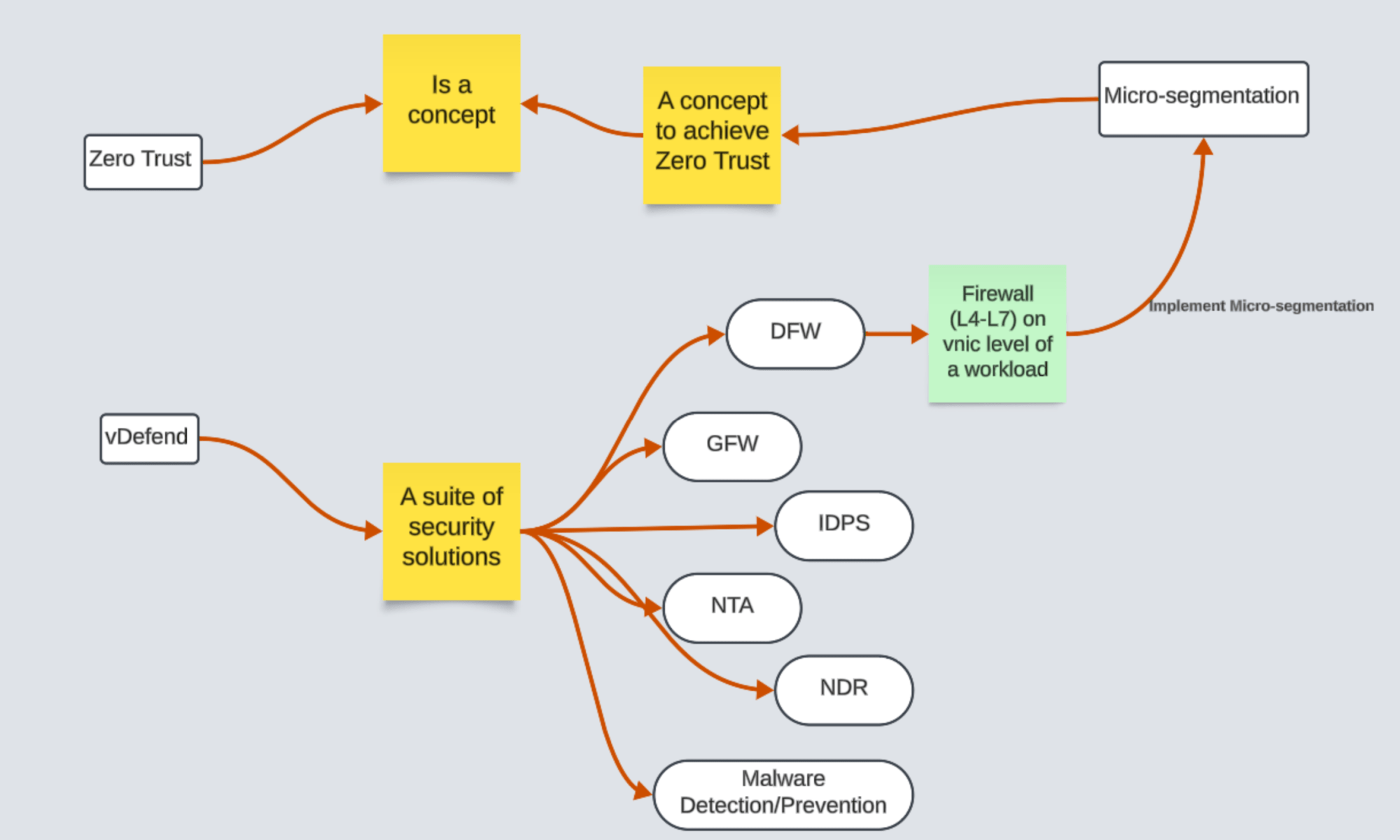
Demystifying Security Terminologies: Zero Trust, Micro Segmentation, and vDefend

A candid conversation about security terminologies in the buzz of current security industry.

CuriousTechie: Hello IT Guy, I am just starting my journey in the IT security industry. I am confused about a few terminologies like Zero Trust, Micro Segmentation, vDefend, DFW, etc. Can you please help me to wrap my head around these to build a better understanding?

ITGuy: Sure, I can help you with that. Let’s follow a Top to Down approach to build the understanding.

CuriousTechie: Okay, what is actually the top layer of this security product?

ITGuy: All of these terms are NOT part of a single security product!!

Let’s start from Zero Trust, Zero Trust is NOT a security product! It is a Concept with various definitions and it is subject to interpretations. Let’s talk about the below definition!

“Zero Trust is a security model that ensures data and resources are inaccessible by default. Users can only access them on a limited basis under the right circumstances, known as least-privilege access.”

Continue reading “Demystifying Security Terminologies: Zero Trust, Micro Segmentation, and vDefend”

Quick Steps: Viewing DFW Rule Creation/Modification Time – Browser API Calls

A short conversation on how to run API calls on Browser to check the time of DFW rule creation or modification time!

CuriousTechie: Hello IT Guy, I need to check the time of creation and modification of a Distributed Firewall rule. Is there a quick way to check these details in the browser itself.

ITGuy: Yes it is doable but depends on the browser, what browser do you use?

CuriousTechie: Currently I am using Mozilla Firefox for this environment, will it be possible to get this data out of the box without any extension or plugins?

ITGuy: Yes sure, let’s login to your NSX manager UI and will show you how to get this information.

CuriousTechie: Here is my NSX manager Policy UI and I need to find the time of creation/modification details of rule number 2024.

Continue reading “Quick Steps: Viewing DFW Rule Creation/Modification Time – Browser API Calls”

NSX Intelligence: Checking Applied Rules on a VM

A short conversation on how to check the applied Distributed Firewall Rules on a VM by using NSX Intelligence!!

CuriousTechie: Hello IT Guy, during our last conversation here we discussed about three ways to check applied DFW rules but you did mention there is another way to check the rules, can we talk about that?

ITGuy: Sure ! You can leverage Security Intelligence aka NSX intelligence to validate the rules applied on a VM.

CuriousTechie: I have been using Security Intelligence to get flow information and recommendations but never seen how to check applied rules using it, can you show me?

ITGuy: Sure !

  1. Go to Plan & Troubleshoot
  2. Go to Discover & Take Action
  3. On the Top bar Select Computer -> Search and select the VM that you want to check the applied rules.
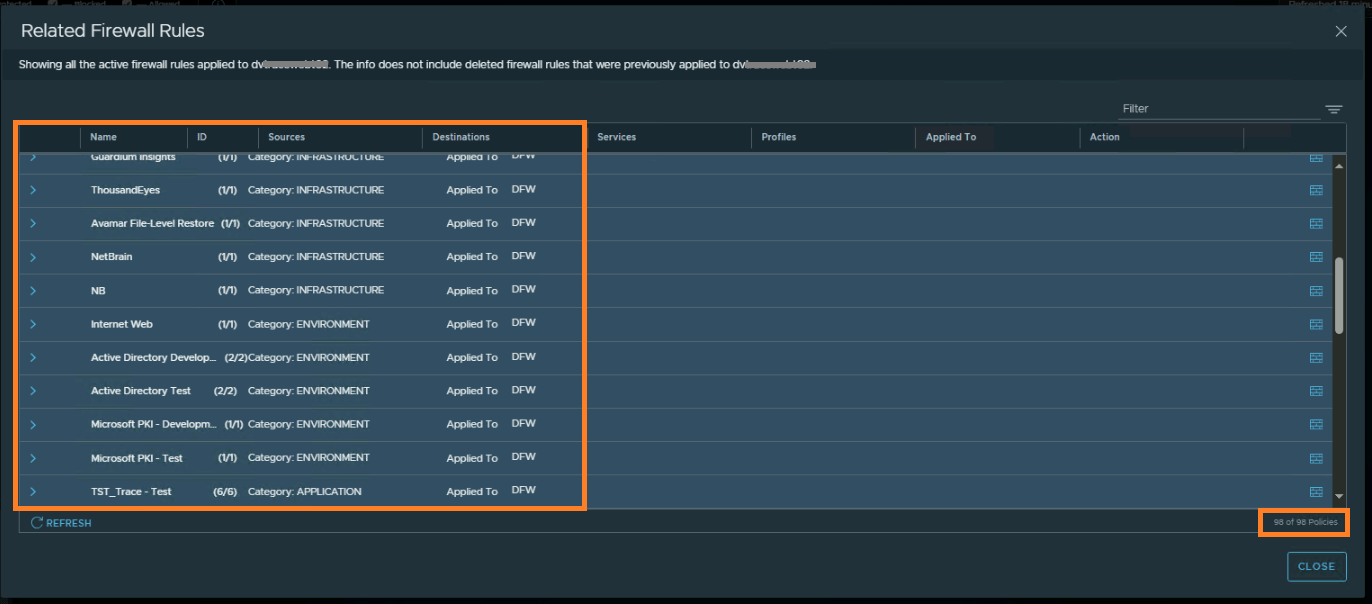
  4. Right click the VM -> Go to Related Firewall Rules
  5. You will see all the rules applied on that particular VM
Continue reading “NSX Intelligence: Checking Applied Rules on a VM”

3 Ways to Verify Applied Distributed Firewall Rules on a VNIC

A short conversation on how to check the applied Distributed Firewall Rules on a vnic!!

CuriousTechie: Hello IT Guy, I am working on a project to implement DFW rules in an environment and often need to check exactly what firewall rules are applied on a vnic, is there a way to do that?

ITGuy: Sure ! We can talk about three different ways to do that and we can talk about pro’s and con’s of each.

CuriousTechie: Okay cool!

ITGuy:

  • From NSX UI
  • From ESXi Host shell
  • From ARIA Operations for Networks aka vRNI
Continue reading “3 Ways to Verify Applied Distributed Firewall Rules on a VNIC”

AVI (NSX-ALB) Quick tip for troubleshooting network connectivity!

A short conversation on how to check and troubleshoot network connectivity from AVI Service Engines.

CuriousTechie: Hello IT Guy, I am new to AVI and sometimes I get stuck in troubleshooting connectivity issues on service engines. Is there a way to check connectivity of the data nics from the service engines?

ITGuy: Sure there is a simple way! You may login to the network namespace of the data nic inside the service engine and check the connectivity.

CuriousTechie: Can you please show me how to do that? Here is my scenario!

I have NSX-T cloud with service engines running, I have created a virtual service but the Virtual Service is DOWN and the Pool is DOWN as well. Also I am not able to reach the SE data nics.

Continue reading “AVI (NSX-ALB) Quick tip for troubleshooting network connectivity!”

NSX API: Quick Troubleshooting Trick

A conversation about using browser Developer tools to validate NSX API’s for quick troubleshooting in some cases.

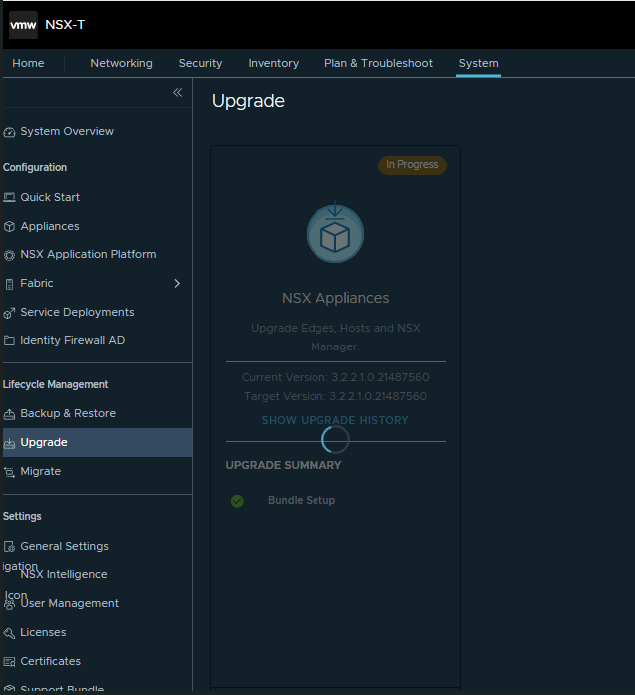
CuriousTechie: Hello IT Guy, I am planning to upgrade my NSX but I see a problem with the upgrade status in UI and not sure where to start the troubleshoot process.

ITGuy: Okay sure! Let’s take a look at the problem then we can get some clue to move ahead.

CuriousTechie: My upgrade screen is stuck like this.

Continue reading “NSX API: Quick Troubleshooting Trick”

VMC: Understand GFW on Customer Managed CGW (Tier-1 Gateway)

A conversation about how Gateway Firewall works on a Customer Managed Compute Gateway (CGW) i.e. custom Tier-1 Gateway implemented on VMware Cloud On AWS.

CuriousTechie: Hello IT Guy, I am exploring the functionality of Customer Managed CGW in VMConAWS and I am confused about the Gateway Firewall implementation. Can we discuss how it is implemented?

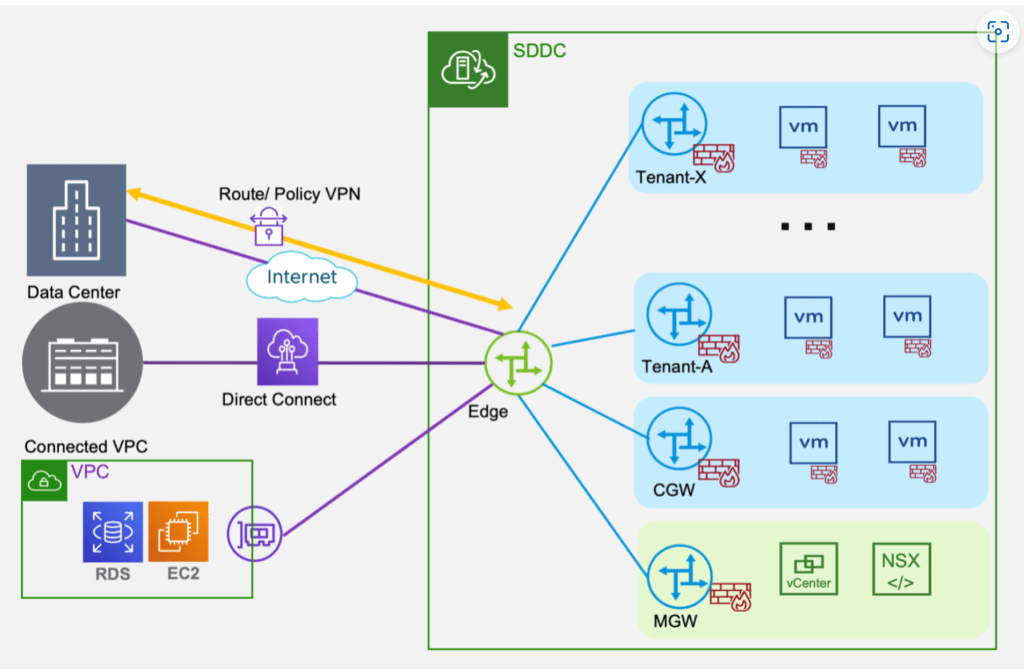
ITGuy: Sure! Did you get a chance to read this blog post here, it provides a good description of the feature and its functionality. On a high level the topology looks like this.

CuriousTechie: Yes, I have read this post, but the implementation of Gateway Firewall is still not clear to me. For example, when I try to configure rules on CGW, I get the option in the Applied To field to select the uplink where I want to apply the rule as shown below.

Continue reading “VMC: Understand GFW on Customer Managed CGW (Tier-1 Gateway)”

NSX ALB – A conversation about GSLB Basics

CuriousTechie: Hey, I am learning to setup Global Server Load Balancing on AVI. I do not have much experience on GSLB especially with AVI or NSX ALB, can you help me understand the basic concept of GSLB with NSX ALB?

ITGuy: Sure! Are you good with how GSLB works irrespective of the Load Balancer?

CuriousTechie: I know some basics, but a white board refresher will be helpful.

ITGuy: Sure! Let’s see what happens when you type a URL in your favourite web browser. You input a URL lets say “curioustechies.in”and DNS does its magic and run multiple DNS queries to find you the IP of the web site/server that you are looking for. I believe you have a fair understanding of how DNS works so will not go much deep into it. OK?

Continue reading “NSX ALB – A conversation about GSLB Basics”

NSX ALB Virtual Service Placement

A conversation about placement of Virtual Services on NSX ALB Service Engines

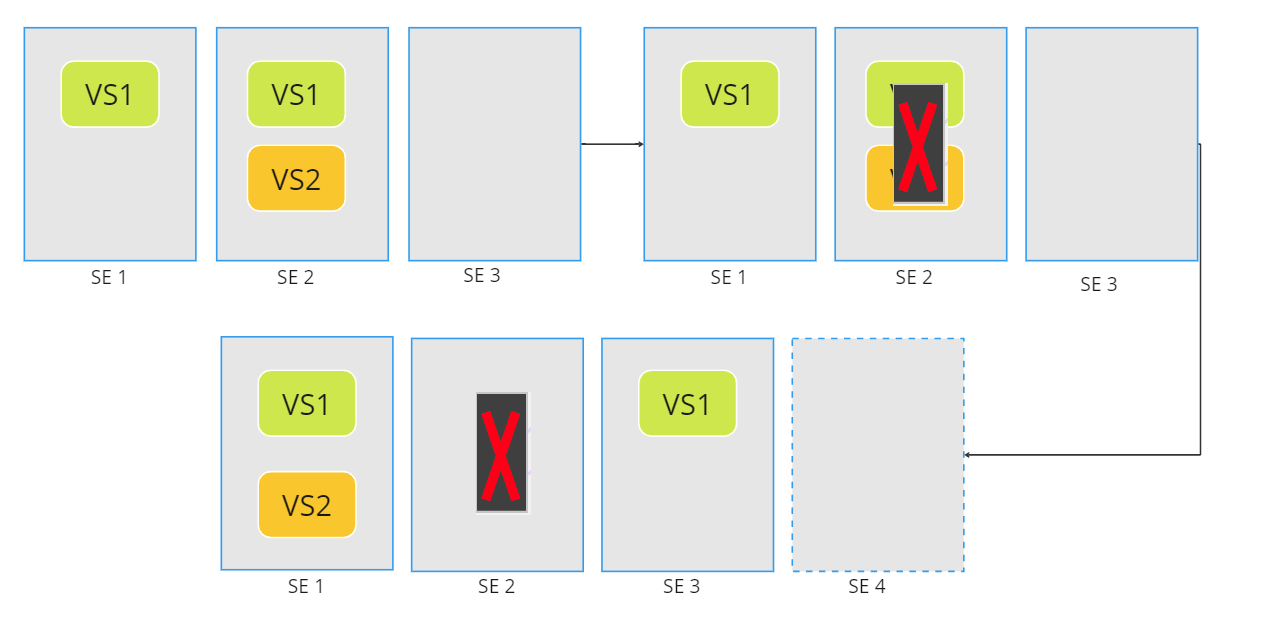
CuriousTechie: Hey IT Guy, I am starting my starting my journey with NSX ALB and I am little confused with different knobs in the Service Engine Group setting to manage the Virtual Service Placement. Can you show me around the setting to build a better understanding?

ITGuy: Yes, sure! Let’s start with some basic understanding of the knobs and then we can work on few scenarios to see how the placement works.

Continue reading “NSX ALB Virtual Service Placement”

Quick NSX D-IDPS validation

A conversation about basic validation of NSX Distributed Intrusion Detection and Prevention System

CuriousTechie: Hey IT Guy, I am doing a Green filed deployment and have enabled NSX distributed IDPS in the environment. It may take few days to setup a testing environment with Security testing tools to simulate attacks and validate if the NSX D-IDPS is actually working or not. Is there a way to quicky validate the basic intrusion detection and prevention functionality of the solution?

Continue reading “Quick NSX D-IDPS validation”