Monitoring vDefend Distributed Firewall Operations

In this short conversation we will talk about monitoring the operations of a vDefend Distributed Firewall implementation.

CuriousTechie: Hello IT Guy! We had a conversation about implementing micro-segmentation here. I began implementing micro-segmentation in our VMware Software Defined Data Center(SDDC) environment using vDefend Distributed Firewall. Multiple engineers work simultaneously to implement the rules and secure their respective applications. I am looking for a way to audit these operations to detect any unintended rule creation, modification or deletion. Can you help me with some pointers to monitor these activities?

ITGuy: In my honest opinion, logs are your best friend when you want to monitor DFW operations. You can very well customize what you want to monitor and how? You can choose dashboards for certain activities and alerts for critical activities.

CuriousTechie: What tools will I need to build these dashboards and alerts?

ITGuy: Some very common ones are vRealize LogInsight aka Aria Operation for Logs here, Splunk here etc. You can use any other log aggregator of your choice to do this.

Continue reading “Monitoring vDefend Distributed Firewall Operations”

Enhancing SDDC Security with vDefend NTA Insights

A discussion on vDefend NTA( Network Traffic Analysis) and how it can improve the SDDC security posture.

CuriousTechie: In our last conversation here, we briefly touched upon NTA (Network Traffic Analysis). I am trying to explore more about it. However, I do not see the term NTA anywhere in NSX or NAPP UI. Can you help me understand, how can I get started with NTA?

ITGuy: I absolutely understand your confusion here. NTA is not a feature that you can enable directly on the NAPP UI. NTA actually piggy backs on top of NSX Intelligence and you can enable NTA detectors once you enable Intelligence.

Network Traffic Analysis (NTA) helps you(security admin) to detect anomalous activity and malicious behavior in the environment. NTA examines network traffic and traffic flow records by using machine learning (ML) algorithms and advanced statistical techniques. NTA identifies abnormal activity, whether it be by hosts, in protocols, or inside the network traffic itself.

CuriousTechie: Where can I find it in NSX UI?

ITGuy: In NSX UI, you will find these NTA detectors under Security-> Suspicious Traffic -> Detector Definitions. As of today there are 14 detectors which you can enable.

CuriousTechie: Are there any pre-requisites to enable and use these detectors?

ITGuy: Pre-requisites are pretty straight forward for NTA.

  • Need a valid vDefend ATP(Advanced Threat Prevention) license
  • Enable Intelligence(collect flows) on NAPP(run ML for analysis)

NTA detectors are broadly classified into two types.

  1. Detectors which needs a learning period to establish a baseline of the network traffic pattern. Any deviation from this baseline get categorized as an event after the learning period. Learning period can be between 6 to 14 days depending on the detector.
  2. Detectors which do NOT need a learning period and can generate events based on if/else condition of network traffic pattern.

CuriousTechie: Can you please help me with an example of both the types of detectors?

ITGuy: Sure!

  • Destination IP Profiler: Detects the attempt made by internal devices to perform unusual connections toward other internal hosts. It needs a learning period of 10 days. This time establishes a baseline of what is a normal traffic pattern between two internal endpoints. As there can be various traffic patterns between two endpoints thus a learning period is required.
  • Domain Generation Algorithm: This detector identifies anomalies in the DNS lookups made by an internal host. These anomalies may be caused by DGA (Domain Generation Algorithm) malware. For example, unresolved DNS records (NXDOMAIN)which can be one the indicators for DGA. This detector looks for a very specific network pattern. Therefore, it does NOT need a learning period to establish a baseline.

NOTE: Domain Generation Algorithm is a program that generates large numbers of domain names that are used to launch malware attacks, host malicious content, or redirect users to malicious websites. Cybercriminals use DGAs to make it difficult for security professionals to predict and block these domains because they constantly change. 

CuriousTechie: Do I need to implement DFW micro-segmentation before I can implement/enable NTA?

ITGuy: Absolutely Not! Network Traffic Analysis is a Detective security tool in the environment and Firewalls are Preventive/Corrective security tools. They will compliment each other for a comprehensive security posture but have no dependency on each other.

NOTE: There are two NTA detectors DGA & DNS Tunneling, which actually needs a Firewall rule with L7 DNS context profile. This is required to extract the DNS information for the detection. This can be an open rule allowing DNS traffic with a L7 context profile. Alternatively, it can be scoped to your environment’s DNS server as the destination, depending on the environment.

CuriousTechie: Is there any dependency between IDPS(Intrusion Detection and Prevention System) and NTA?

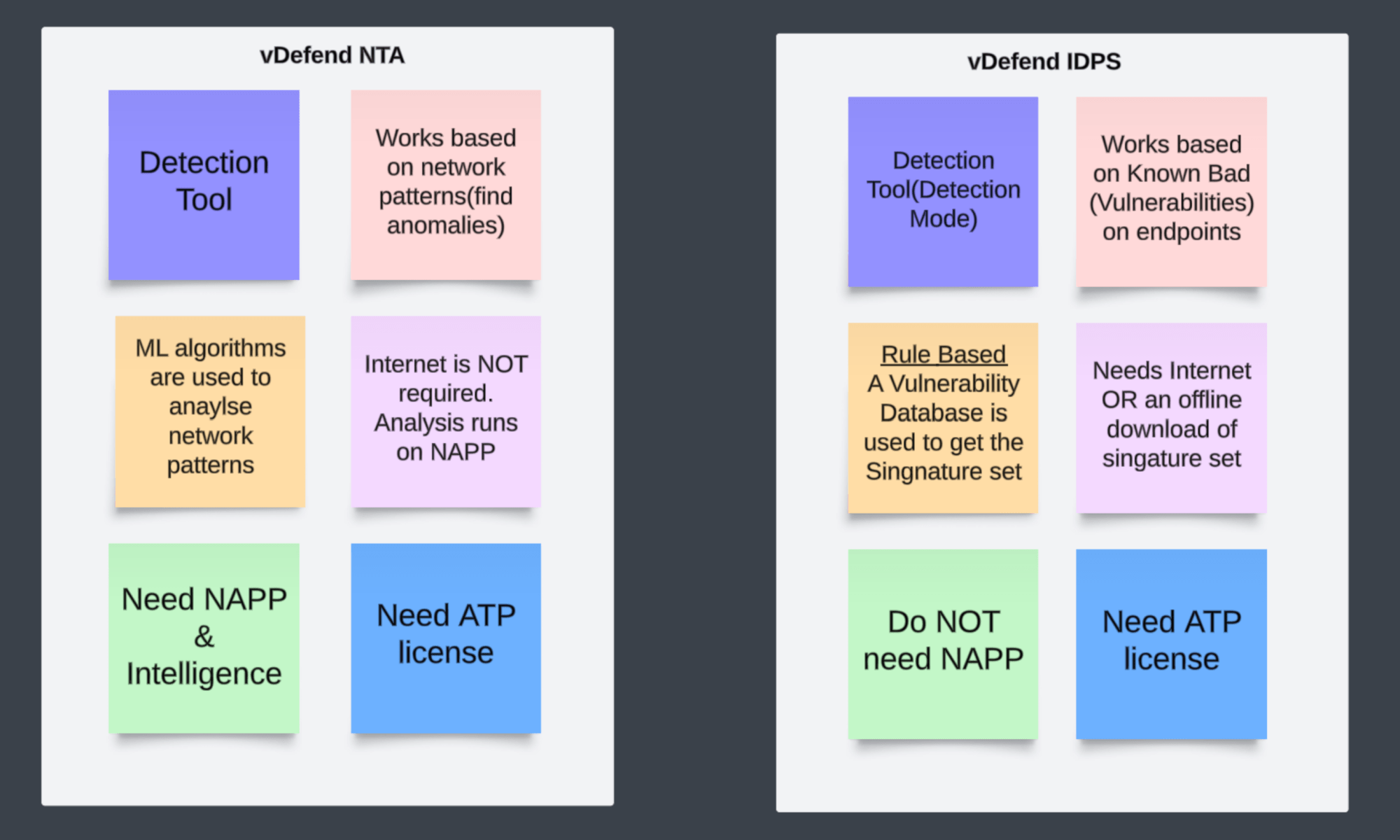
ITGuy: NO! Both NTA and IDS (Intrusion Detection System) are detection tools. But they work differently, and there is no dependency between vDefend NTA and IDS. Let me help you with some point about each of them.

CuriousTechie: This is very helpful! Can you point to me to some more resources for further reading and understanding of vDefend NTA.

ITGuy: Sure! You can check out the Official white papers here. If you are interested in learning with a Hands On approach then you can try this hands on lab “VMware vDefend Firewall with Advanced Threat Prevention HOL-2570-02-ANS-L” here

CuriousTechie: Thank you!

Unlocking Micro-Segmentation Potential with vDefend Security Intelligence

A discussion on vDefend Security Intelligence, also known as NSX Intelligence, for enhanced visibility within the Software-Defined Datacenter.

CuriousTechie: Hello IT Guy. In our last conversation here, we discussed micro-segmentation. Now, I have a solid understanding of how vDefend DFW can support it. However, I’m managing an existing brownfield environment with hundreds of applications and thousands of virtual machines. What’s the best approach to implement micro-segmentation in such a complex setup?

ITGuy: This is a very common scenario faced by every enterprise when they embark on their journey towards micro-segmentation. To sail through this journey you need two major things to consider as mentioned below.

  • A methodology
  • Tools
Continue reading “Unlocking Micro-Segmentation Potential with vDefend Security Intelligence”

Demystifying Security Terminologies: Zero Trust, Micro Segmentation, and vDefend

A candid conversation about security terminologies in the buzz of current security industry.

CuriousTechie: Hello IT Guy, I am just starting my journey in the IT security industry. I am confused about a few terminologies like Zero Trust, Micro Segmentation, vDefend, DFW, etc. Can you please help me to wrap my head around these to build a better understanding?

ITGuy: Sure, I can help you with that. Let’s follow a Top to Down approach to build the understanding.

CuriousTechie: Okay, what is actually the top layer of this security product?

ITGuy: All of these terms are NOT part of a single security product!!

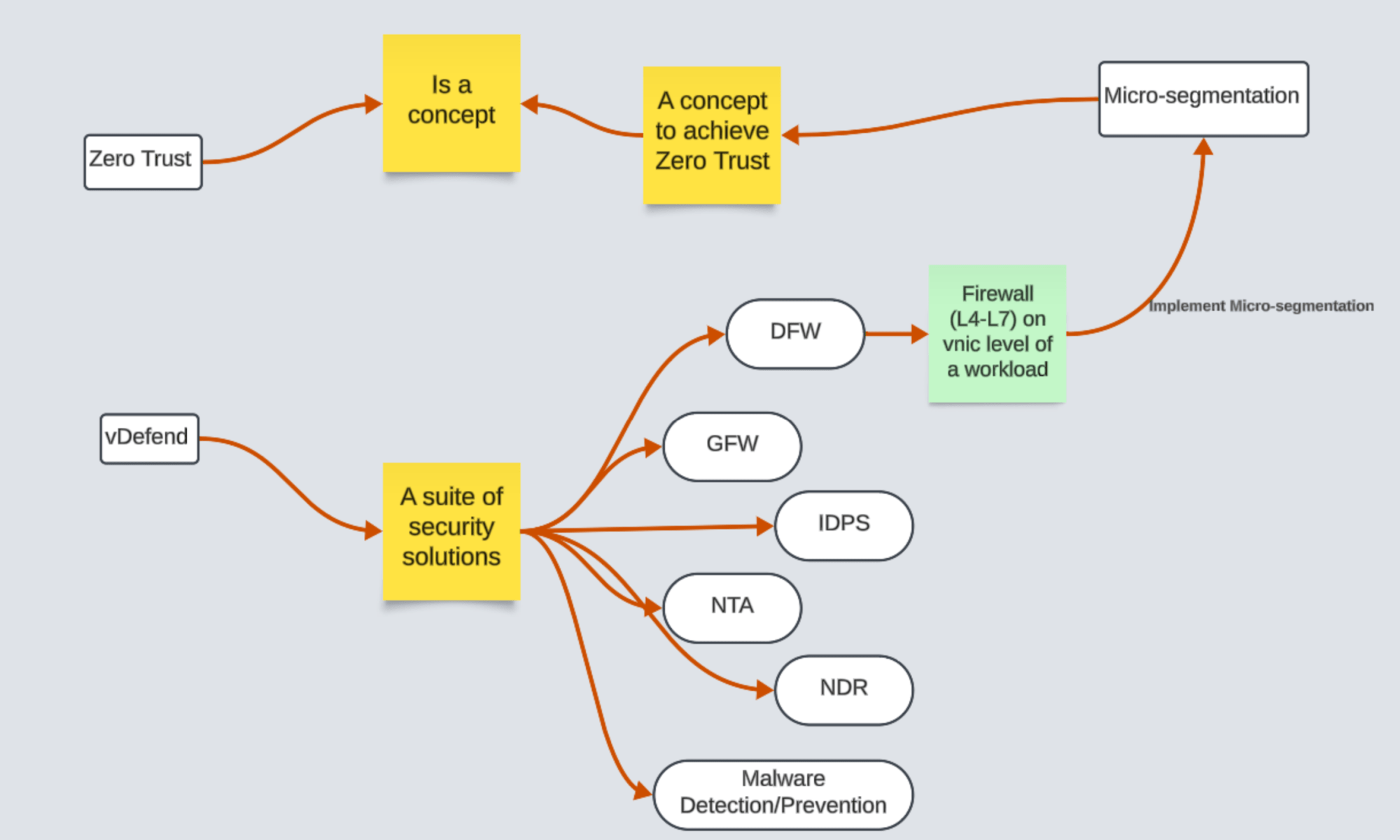
Let’s start from Zero Trust, Zero Trust is NOT a security product! It is a Concept with various definitions and it is subject to interpretations. Let’s talk about the below definition!

“Zero Trust is a security model that ensures data and resources are inaccessible by default. Users can only access them on a limited basis under the right circumstances, known as least-privilege access.”

Continue reading “Demystifying Security Terminologies: Zero Trust, Micro Segmentation, and vDefend”

Quick Steps: Viewing DFW Rule Creation/Modification Time – Browser API Calls

A short conversation on how to run API calls on Browser to check the time of DFW rule creation or modification time!

CuriousTechie: Hello IT Guy, I need to check the time of creation and modification of a Distributed Firewall rule. Is there a quick way to check these details in the browser itself.

ITGuy: Yes it is doable but depends on the browser, what browser do you use?

CuriousTechie: Currently I am using Mozilla Firefox for this environment, will it be possible to get this data out of the box without any extension or plugins?

ITGuy: Yes sure, let’s login to your NSX manager UI and will show you how to get this information.

CuriousTechie: Here is my NSX manager Policy UI and I need to find the time of creation/modification details of rule number 2024.

Continue reading “Quick Steps: Viewing DFW Rule Creation/Modification Time – Browser API Calls”

NSX Intelligence: Checking Applied Rules on a VM

A short conversation on how to check the applied Distributed Firewall Rules on a VM by using NSX Intelligence!!

CuriousTechie: Hello IT Guy, during our last conversation here we discussed about three ways to check applied DFW rules but you did mention there is another way to check the rules, can we talk about that?

ITGuy: Sure ! You can leverage Security Intelligence aka NSX intelligence to validate the rules applied on a VM.

CuriousTechie: I have been using Security Intelligence to get flow information and recommendations but never seen how to check applied rules using it, can you show me?

ITGuy: Sure !

  1. Go to Plan & Troubleshoot
  2. Go to Discover & Take Action
  3. On the Top bar Select Computer -> Search and select the VM that you want to check the applied rules.
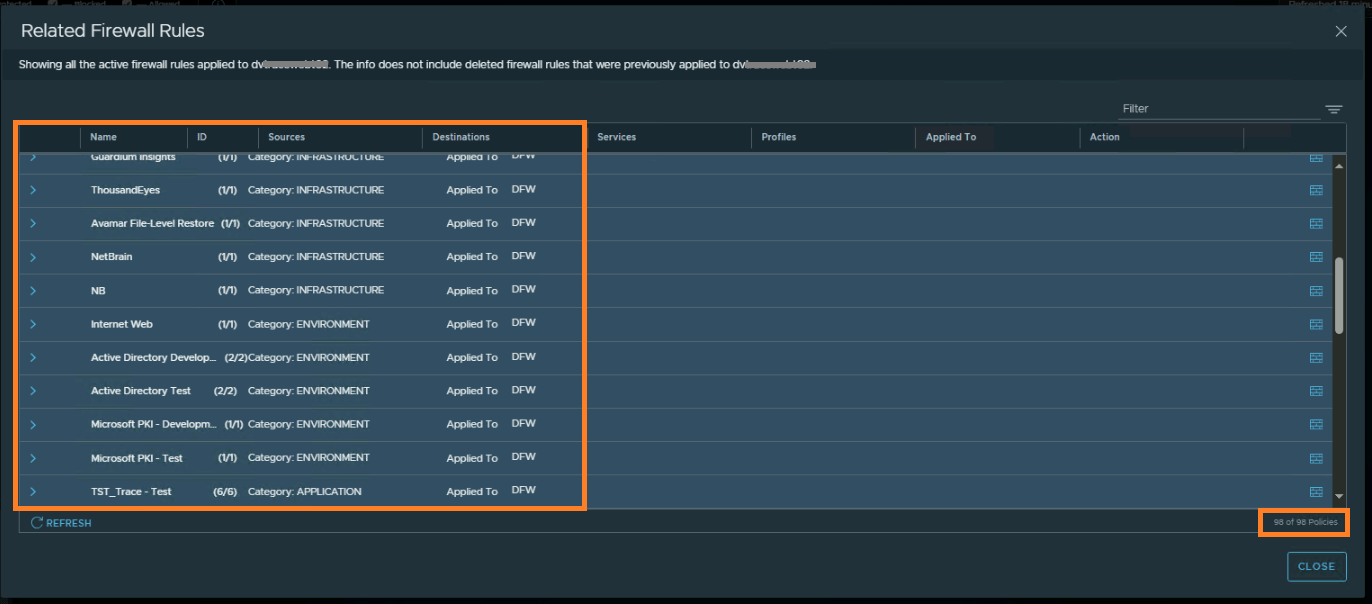
  4. Right click the VM -> Go to Related Firewall Rules
  5. You will see all the rules applied on that particular VM
Continue reading “NSX Intelligence: Checking Applied Rules on a VM”

3 Ways to Verify Applied Distributed Firewall Rules on a VNIC

A short conversation on how to check the applied Distributed Firewall Rules on a vnic!!

CuriousTechie: Hello IT Guy, I am working on a project to implement DFW rules in an environment and often need to check exactly what firewall rules are applied on a vnic, is there a way to do that?

ITGuy: Sure ! We can talk about three different ways to do that and we can talk about pro’s and con’s of each.

CuriousTechie: Okay cool!

ITGuy:

  • From NSX UI
  • From ESXi Host shell
  • From ARIA Operations for Networks aka vRNI
Continue reading “3 Ways to Verify Applied Distributed Firewall Rules on a VNIC”

Quick NSX D-IDPS validation

A conversation about basic validation of NSX Distributed Intrusion Detection and Prevention System

CuriousTechie: Hey IT Guy, I am doing a Green filed deployment and have enabled NSX distributed IDPS in the environment. It may take few days to setup a testing environment with Security testing tools to simulate attacks and validate if the NSX D-IDPS is actually working or not. Is there a way to quicky validate the basic intrusion detection and prevention functionality of the solution?

Continue reading “Quick NSX D-IDPS validation”